
<?xml version="1.0" encoding="UTF-8"?><rss version="2.0"
	xmlns:content="http://purl.org/rss/1.0/modules/content/"
	xmlns:wfw="http://wellformedweb.org/CommentAPI/"
	xmlns:dc="http://purl.org/dc/elements/1.1/"
	xmlns:atom="http://www.w3.org/2005/Atom"
	xmlns:sy="http://purl.org/rss/1.0/modules/syndication/"
	xmlns:slash="http://purl.org/rss/1.0/modules/slash/"
	>

<channel>
	<title>ZIZO &#8211; UseManuals</title>
	<atom:link href="http://usemanuals.com/zizo/feed/" rel="self" type="application/rss+xml" />
	<link>https://usemanuals.com</link>
	<description>Owner&#039;s manuals for all sorts of products</description>
	<lastBuildDate>Mon, 08 May 2023 17:15:10 +0000</lastBuildDate>
	<language>en-US</language>
	<sy:updatePeriod>
	hourly	</sy:updatePeriod>
	<sy:updateFrequency>
	1	</sy:updateFrequency>
	<generator>https://wordpress.org/?v=6.7.2</generator>

<image>
	<url>https://usemanuals.com/wp-content/uploads/2025/02/favicon-32x32-2.png</url>
	<title>ZIZO &#8211; UseManuals</title>
	<link>https://usemanuals.com</link>
	<width>32</width>
	<height>32</height>
</image> 
	<item>
		<title>ZIZO Venture Built for Adventure Wireless Earbuds Manual</title>
		<link>https://usemanuals.com/zizo/venture-earbuds/</link>
		
		<dc:creator><![CDATA[ItsManual]]></dc:creator>
		<pubDate>Mon, 08 May 2023 17:15:10 +0000</pubDate>
				<category><![CDATA[ZIZO]]></category>
		<guid isPermaLink="false">https://usemanuals.com/?p=104643</guid>

					<description><![CDATA[&#160; QUICK START GUIDE VENTURE ZIZO BUILT FOR ADVENTURE PACKAGE CONTENTS IN THE BOX 2 x Venture Earbuds (L. R) 1 x Charging Case 1 x USB-C Charging Cable 4x Eartips (XS, S, M, L) 1x Quick Start Guide Case – Charger port (USB Type-C) – Battery indicator light – Charging contacts – Function button LAYOUT GETTING STARTED Before Leong your °caw&#38; the lest limo. hay charge the outfit. CHARGING Ensure both buds are security played in the charging case Close the lid and connect included cable to a power source USING YOUR DEVICE BLUETOOTH PAIRING Tap and hold earbuds simultaneously to entity True Wireless Mode You will hear voice feedback confirming left and right channels Navigate to your device Bluetooth setting, and select ZIZO VINTURC from the available device list CONTROLS MUSIC ADDITIONAL FEATURES PHONE CALLS Double-tap either Venture Bud to answer incoming calls LAUNCHING VOICE ASSISTANT Press and hold either earbud for 2 seconds to activate your phone’s voice assistant TECHNICAL SPECIFICATIONS SPECIFICATIONS Model: Venture Bluetooth43) Wireless Technology: V 5.0 Wireless Transmission Distance: Up to 35 ft Battery Capacity (Earbud): 50 mAh Battery Capacity (Charging Case): 300 mAh Frequency: 2.4 GHz Frequency response: 50HZ-20KHZ Sensitivity:106 dB Vocal Trock System: True Stereo (TWS) SNR: &#62; 85dB IMPORTANT SAFEGUARDS: Do not allow water to spill onto the surface or into the product. Children should be supervised while operating this device. If the product surface is damaged or if there is a mechanical or electrical malfunction, do not use the unit. Contact ZIZO customer support. Do not place the unit in water. Do not place the product indirect heat. This unit is to be placed in a dry and ventilated place. 6. Do not place heavy objects on the unit. WARRANTY INFORMATION At ZIZO, we are 100% committed to your satisfaction. We stand behind our products and offer a 1-year manufacturer warranty against defects in materials or workmanship of your new ZIZO earbuds. Should you find your item to be defective, simply visit zizowireless.com/warranty to submit a brief Warranty Service Request Form. Warranty applies to products purchased from ZIZO Authorized resellers. International product registration is not available at this time. U.S. Customers Only. CONTACT US ZIZO CUSTOMER SERVICE EMAIL info@zizowireless.com TELEPHONE +1(909) 444-7992 WEBSITE zizowireless.com/support ZIZOWIRELESS ZIZOWIRELESS.COM @ 2021 ZIZO, All Rights Reserved. The Bluetooth word mark and logos are registered trademarks owned by Bluetooth SIG. Inc. and any use of such marks by Balaji Trading Inc. is under license. Other trademarks and trade names are those of their respective owners. ‘Images on packaging used for illustration purposes. The actual product may vary due to continuous refinements. This equipment has been tested and found to comply with the limits for a Class B digital device, pursuant to part 15 of the FCC Rules. These limits are designed to provide reasonable protection against harmful interference in a residential installation. This equipment generates, uses, and can radiate radio frequency energy and, if not installed and used in accordance with the instructions, may cause harmful interference to radio communications. However, there is no guarantee that interference will not occur in a particular installation. If this equipment does cause harmful interference to radio or television reception, which can be determined by turning the equipment off and on, the user is encouraged to try to correct the interference by one or more of the following measures: · Reorient or relocate the receiving antenna. · Increase the separation between the equipment and receiver. · Connect the equipment into an outlet on a circuit different from that to which the receiver is connected. · Consult the dealer or an experienced radio/TV technician for help. Caution: Any changes or modifications to this device not explicitly approved by the manufacturer could void your authority to operate this equipment. This device complies with part 15 of the FCC Rules. Operation is subject to the following two conditions: (1) This device may not cause harmful interference, and (2) this device must accept any interference received, including interference that may cause undesired operation. The device has been evaluated to meet general RF exposure requirements. [...]<p><a class="btn btn-secondary understrap-read-more-link" href="https://usemanuals.com/zizo/venture-earbuds/">Read More...</a></p>]]></description>


										<content:encoded><![CDATA[<p>&nbsp;</p>
<p><img decoding="async" src="https://usemanuals.com/wp-content/uploads/2023/04/ZIZO-logo-1.webp" /></p>
<p><strong>QUICK START GUIDE</strong><br />
<strong>VENTURE</strong><br />
<strong>ZIZO</strong><br />
<strong>BUILT FOR ADVENTURE</strong></p>
<h4>PACKAGE CONTENTS</h4>
<p><strong>IN THE BOX</strong></p>
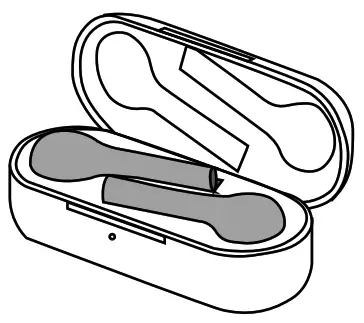
<p><img decoding="async" src="https://usemanuals.com/wp-content/uploads/2023/04/ZIZO-Venture-Built-for-Adventure-Wireless-Earbuds.webp" /></p>
<p>2 x Venture Earbuds (L. R)<br />
1 x Charging Case<br />
1 x USB-C Charging Cable<br />
4x Eartips (XS, S, M, L)<br />
1x Quick Start Guide<br />
<strong>Case</strong><br />
– Charger port (USB Type-C)<br />
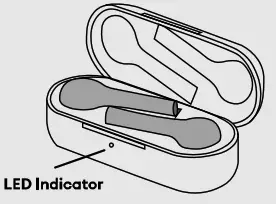
– Battery indicator light<br />
– Charging contacts<br />
– Function button</p>
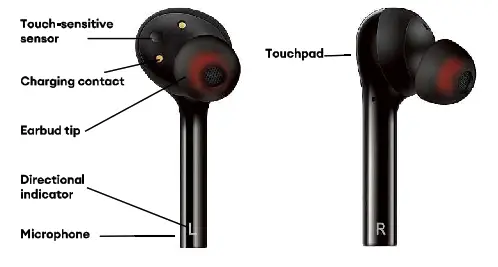
<h4>LAYOUT</h4>
<p><img decoding="async" src="https://usemanuals.com/wp-content/uploads/2023/04/ZIZO-Venture-Built-for-Adventure-Wireless-Earbuds-layout.webp" /></p>
<h4>GETTING STARTED</h4>
<p>Before Leong your °caw&amp; the lest limo. hay charge the outfit.<br />
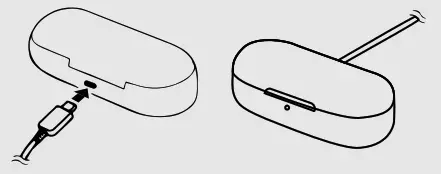
<strong>CHARGING</strong></p>
<ol>
<li>Ensure both buds are security played in the charging case<img decoding="async" src="https://usemanuals.com/wp-content/uploads/2023/04/ZIZO-Venture-Built-for-Adventure-Wireless-Earbuds-Charging.webp" /></li>
<li>Close the lid and connect included cable to a power source<img decoding="async" src="https://usemanuals.com/wp-content/uploads/2023/04/ZIZO-Venture-Built-for-Adventure-Wireless-Earbuds-Charging-2.webp" /></li>
</ol>
<h4>USING YOUR DEVICE</h4>
<p><strong>BLUETOOTH PAIRING</strong></p>
<ol>
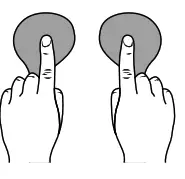
<li>Tap and hold earbuds simultaneously to entity True Wireless Mode</li>
<li>You will hear voice feedback confirming left and right channels</li>
<li>Navigate to your device Bluetooth setting, and select ZIZO VINTURC from the available device list<img decoding="async" src="https://usemanuals.com/wp-content/uploads/2023/04/ZIZO-Venture-Built-for-Adventure-Wireless-Earbuds-Divice.webp" /></li>
</ol>
<h4>CONTROLS</h4>
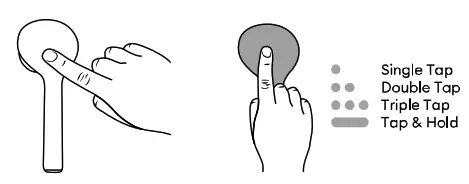
<p><img decoding="async" src="https://usemanuals.com/wp-content/uploads/2023/04/ZIZO-Venture-Built-for-Adventure-Wireless-Earbuds-Controls.webp" /></p>
<h4>MUSIC</h4>
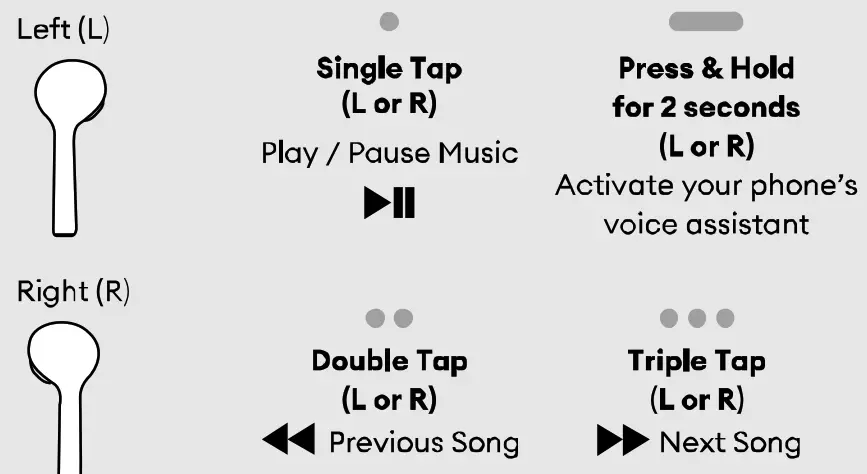
<p><img decoding="async" src="https://usemanuals.com/wp-content/uploads/2023/04/ZIZO-Venture-Built-for-Adventure-Wireless-Earbuds-Music.webp" /></p>
<h4>ADDITIONAL FEATURES</h4>
<p><strong>PHONE CALLS</strong></p>
<p>Double-tap either Venture Bud to answer incoming calls</p>
<h4>LAUNCHING VOICE ASSISTANT</h4>
<p>Press and hold either earbud for 2 seconds to activate your phone’s voice assistant</p>
<h4>TECHNICAL SPECIFICATIONS</h4>
<p><strong>SPECIFICATIONS</strong><br />
Model: Venture<br />
Bluetooth43) Wireless Technology: V 5.0 Wireless Transmission Distance: Up to 35 ft Battery Capacity (Earbud): 50 mAh Battery Capacity (Charging Case): 300 mAh Frequency: 2.4 GHz Frequency response: 50HZ-20KHZ Sensitivity:106 dB Vocal Trock System: True Stereo (TWS) SNR: &gt; 85dB</p>
<h4>IMPORTANT SAFEGUARDS:</h4>
<ol>
<li>Do not allow water to spill onto the surface or into the product.</li>
<li>Children should be supervised while operating this device.</li>
<li>If the product surface is damaged or if there is a mechanical or electrical malfunction, do not use the unit. Contact ZIZO customer support.</li>
<li>Do not place the unit in water.</li>
<li>Do not place the product indirect heat. This unit is to be placed in a dry and ventilated place. 6. Do not place heavy objects on the unit.</li>
</ol>
<p><img decoding="async" src="https://usemanuals.com/wp-content/uploads/2023/04/ZIZO-Venture-Built-for-Adventure-Wireless-Earbuds-Symbol.webp" /></p>
<h4>WARRANTY INFORMATION</h4>
<p>At ZIZO, we are 100% committed to your satisfaction. We stand behind our products and offer a 1-year manufacturer warranty against defects in materials or workmanship of your new ZIZO earbuds.<br />
Should you find your item to be defective, simply visit zizowireless.com/warranty to submit a brief Warranty Service Request Form. Warranty applies to products purchased from ZIZO Authorized resellers. International product registration is not available at this time. U.S. Customers Only.</p>
<h4>CONTACT US</h4>
<p><strong>ZIZO CUSTOMER SERVICE</strong><br />
EMAIL <a href="mailto:info@zizowireless.com">info@zizowireless.com</a><br />
TELEPHONE +1(909) 444-7992<br />
WEBSITE <a href="http://zizowireless.com/support" target="_blank" rel="noopener">zizowireless.com/support</a><br />
ZIZOWIRELESS</p>
<p><img decoding="async" src="https://usemanuals.com/wp-content/uploads/2023/04/ZIZO-Venture-Built-for-Adventure-Wireless-Earbuds-Online.webp" /><br />
<a href="http://ZIZOWIRELESS.COM" target="_blank" rel="noopener">ZIZOWIRELESS.COM</a></p>
<p>@ 2021 ZIZO, All Rights Reserved. The Bluetooth word mark and logos are registered trademarks owned by Bluetooth SIG. Inc. and any use of such marks by Balaji Trading Inc. is under license. Other trademarks and trade names are those of their respective owners.<br />
‘Images on packaging used for illustration purposes. The actual product may vary due to continuous refinements.</p>
<p>This equipment has been tested and found to comply with the limits for a Class B digital device, pursuant to part 15 of the FCC Rules. These limits are designed to provide reasonable protection against harmful interference in a residential installation. This equipment generates, uses, and can radiate radio frequency energy and, if not installed and used in accordance with the instructions, may cause harmful interference to radio communications. However, there is no guarantee that interference will not occur in a particular installation. If this equipment does cause harmful interference to radio or television reception, which can be determined by turning the equipment off and on, the user is encouraged to try to correct the interference by one or more of the following measures: · Reorient or relocate the receiving antenna. · Increase the separation between the equipment and receiver. · Connect the equipment into an outlet on a circuit different from that to which the receiver is connected. · Consult the dealer or an experienced radio/TV technician for help.<br />
Caution: Any changes or modifications to this device not explicitly approved by the manufacturer could void your authority to operate this equipment.<br />
This device complies with part 15 of the FCC Rules. Operation is subject to the following two conditions: (1) This device may not cause harmful interference, and (2) this device must accept any interference received, including interference that may cause undesired operation.<br />
The device has been evaluated to meet general RF exposure requirements.</p>
<form id="commentform" class="comment-form" action="https://manuals.plus/wp-comments-post.php" method="post" novalidate="">
<p class="form-submit"><input id="comment_post_ID" name="comment_post_ID" type="hidden" value="1753555" /><br />
<input id="comment_parent" name="comment_parent" type="hidden" value="0" /></p>
</form>
]]></content:encoded>


			</item>
	</channel>
</rss>

<!--
Performance optimized by W3 Total Cache. Learn more: https://www.boldgrid.com/w3-total-cache/

Page Caching using Disk: Enhanced 

Served from: usemanuals.com @ 2026-06-13 02:41:56 by W3 Total Cache
-->