<?xml version="1.0" encoding="UTF-8"?><rss version="2.0"
	xmlns:content="http://purl.org/rss/1.0/modules/content/"
	xmlns:wfw="http://wellformedweb.org/CommentAPI/"
	xmlns:dc="http://purl.org/dc/elements/1.1/"
	xmlns:atom="http://www.w3.org/2005/Atom"
	xmlns:sy="http://purl.org/rss/1.0/modules/syndication/"
	xmlns:slash="http://purl.org/rss/1.0/modules/slash/"
	>

<channel>
	<title>wuuklabs &#8211; UseManuals</title>
	<atom:link href="http://usemanuals.com/wuuklabs/feed/" rel="self" type="application/rss+xml" />
	<link>https://usemanuals.com</link>
	<description>Owner&#039;s manuals for all sorts of products</description>
	<lastBuildDate>Wed, 30 Aug 2023 18:38:51 +0000</lastBuildDate>
	<language>en-US</language>
	<sy:updatePeriod>
	hourly	</sy:updatePeriod>
	<sy:updateFrequency>
	1	</sy:updateFrequency>
	<generator>https://wordpress.org/?v=6.7.2</generator>

<image>
	<url>https://usemanuals.com/wp-content/uploads/2025/02/favicon-32x32-2.png</url>
	<title>wuuklabs &#8211; UseManuals</title>
	<link>https://usemanuals.com</link>
	<width>32</width>
	<height>32</height>
</image> 
	<item>
		<title>wuuklabs Smart Doorbell WUUK Manual</title>
		<link>https://usemanuals.com/wuuklabs/wuuk-doorbell/</link>
		
		<dc:creator><![CDATA[ItsManual]]></dc:creator>
		<pubDate>Wed, 30 Aug 2023 18:38:51 +0000</pubDate>
				<category><![CDATA[wuuklabs]]></category>
		<guid isPermaLink="false">https://usemanuals.com/?p=211756</guid>

					<description><![CDATA[WUUK Smart Doorbell User Manual Please read this manual carefully before using the product. The WUUK app will walk you through setting up and managing your WUUK Doorbell. Search for “WUUK” in one of the app stores below, or visit: wuuklabs.com  Your WiFi password is required for the setup and usage. Make sure you have that by your hand.   https://api.wuuklabs.io/download_app Fully Charge The WUUK Doorbell First, fully charge the built-in battery in the WUUK Doorbell. Plugging it into a power source using the provided charging cable that connects the doorbell from a Micro USB charging port at the back of the doorbell. If you can’t wait to play with your WUUK Doorbell, go ahead and set it up. But, we recommend fully charging it before first-time use. Quick Installation Power Up Your Chime &#60;1&#62; Link the power plug to the WUUK Chime &#60;2&#62; Plug into a power outlet that is between 100V ~ 240V * If the power plug doesn’t fit your country’s power outlet standard, you will need a power plug adapter. Choose The Way You Want to Install The Doorbell Metals, glass, and ceramics, plastics, and PVC YES- 3M VHB Tape (P4-P8) Fibered surfaces such as particleboard, wood, and paints Maybe – 3M VHB Tape YES Screw In (P4, P5, P6, P13) Porous &#38; uneven surfaces such as concrete, stone, limestone, brick Maybe – 3M VHB Tape YES – Screw-In with anchors (P4, P5, P6, P13) Gabion, rubber, leather, peel metope NO – 3M VHB Tape YES – Screw-In YES-Screw In with anchors Better Prepare The Surface for Strong Bond The surface must be dry. Remove heavy levels of dirt or oxide from metals or paints (e.g. galvanized steel). For maximum bond strength, we recommend thoroughly cleaning the surface with a 50:50 mixture of isopropyl alcohol and water. Ideal tape application is accomplished when the temperature is between 70°F and 100°F (21°C and 38°C). Initial tape application to surfaces at temperatures below 50°F (10°C) is not recommended. If you are in a cold area, warm up the tape by using a hairdry­er or other tools. Porous Surfaces Rough, porous, or fibered materials such as wood, particleboard, cement, etc. have an open surface and require sealing to provide a unified surface for tape bonding. Common sealing materials would include paint, varnish, or other hard surface coatings. Abrasion Surfaces For some surfaces, abrading using a Scotch-Brite Hand Pad or power palm sander with a fine-grit will help prepare the surface for better adhesive bonding. Abrading a surface can serve several functions: Smooth a surface to obtain more flatness, allowing improved contact area. Create an additional surface area that can increase adhesion. About The 3MTM VHBTM Tape, We Choose to Use on The WUUK Doorbell VHB stands for Very High Bonding tape. 3MTM VHBTM tapes have been used extensively throughout manufacturing industries since the 1980s. The viscous liquid properties help the adhesive within the VHB tape flows into every microscopic surface to provide a seal against environmental conditions and a high-performance bond. In many situations, VHB tape can replace rivets, welds, screws, and other forms of mechanical fasteners. Reasons why WUUK Labs choose to apply 3MTM VHBTM tapes as a way of installation Quick and simple to apply, and used without extensive specialized training. Superior long-term durability. Cut costs and increase manufacturing efficiency. Moisture resistance. Survive extreme high temperatures. Short term resistance: 200 °F (93 °C) Long term resistance: 158 °F (70 °C) 1 &#60;1&#62; Peel off the red foil that has the 3M VHB texts on it, and attach the backplate to where you want to sit your doorbell. &#60;2&#62; Press hard on the backplate for 5 seconds. &#60;3&#62; Let it be there and dwell for at least 24hours so the 3M VHB tape can sink into the surface and build the strongest bond. * 72 hours are recommended. If you are applying the 1 Minute Installation, for final steps, go to P14. (If you choose to use the battery for power, please skip this page) We highly recommend users who use the doorbell in cold weather areas (-4°F / -20°C) wire the device in order to keep the battery working properly. (Optional) Hardwire the WUUK Doorbell for Power Make sure the wires go through the backplate. Connect The Wires Connect the wires coming out of your wall to the screws on the back of your WUUK Doorbell. Either wire can connect to either screw. The order doesn’t matter. (Optional) Attach The Wire Extensions If you have trouble connecting the wires coming out of your wall to the back of your WUUK Doorbell, use the provided wire extensions and wire nuts. Feed all the wires, and the wire nuts, if you used them, into your wall. If you’re wiring your WUUK Doorbell to a digital doorbell – you’ll know it’s digital if it plays a synthesized melody – then install the included diode. If your existing doorbell is mechanical, DO NOT use the diode, as it can damage your existing doorbell. Not sure? Check wuuklabs.com/diode (If you install the WUUK Doorbell on metals, glass and ceramics, plastics and PVC; Or choose to apply the 3M VHB tape as the installation method, please skip this page) (Optional) Screw On For installing on porous &#38; uneven surfaces such as concrete, stone, limestone, brick; Or you choose to install this way. Install anchors – on stucco, brick, or concrete  Mark 4 drill holes using the locating pad sticker. Use a bit to drill holes in your wall and insert the anchors. Screw it in – on particleboard, wood, and paints Secure your WUUK Doorbell backplate on the wall using the four screws provided. Power up the WUUK Doorbell, and hang the WUUK Doorbell onto the wall mount. Match the four hooks on the back with the four locks on the backplate, and slide down. You will hear a slight clicking sound. You are done! Charge The WUUK Doorbell Before removing the doorbell, please make sure you turn off the Anti-theft Alert in the WUUK app. Remove the WUUK Doorbell from the backplate for charging. Insert the releas­ing pin from the bottom of the doorbell, lift the pin handle a little bit, which helps to push the lock on the backplate to release, while sliding up the doorbell. Continue to set up your WUUK Doorbell in the app. Having troubles? hello@wuvklabs.com support.wuuklabs.com Connect with us and join the WUUK online community www.facebook.com/WUUKLabs/ twitter.com/DoorbellWuuk [...]<p><a class="btn btn-secondary understrap-read-more-link" href="https://usemanuals.com/wuuklabs/wuuk-doorbell/">Read More...</a></p>]]></description>

										<content:encoded><![CDATA[<p><strong>WUUK</strong><br />
<strong>Smart Doorbell</strong><br />
<strong>User Manual</strong></p>
<p>Please read this manual carefully before using the product.</p>
<p>The WUUK app will walk you through setting up and managing your WUUK Doorbell. Search for “WUUK” in one of the app stores below, or visit: <a href="http://wuuklabs.com/" target="_blank" rel="noopener">wuuklabs.com </a></p>
<p>Your WiFi password is required for the setup and usage. Make sure you have that by your hand.</p>
<p><img decoding="async" src="https://usemanuals.com/wp-content/uploads/2023/08/wuuklabs-Smart-Doorbell-QR-CODE.webp" /> <img decoding="async" src="https://usemanuals.com/wp-content/uploads/2023/08/marantz-AV-Pre-Tuner-User-Guide_20.webp" /><br />
<a href="https://api.wuuklabs.io/download_app" target="_blank" rel="noopener">https://api.wuuklabs.io/download_app</a></p>
<h4>Fully Charge The WUUK Doorbell</h4>
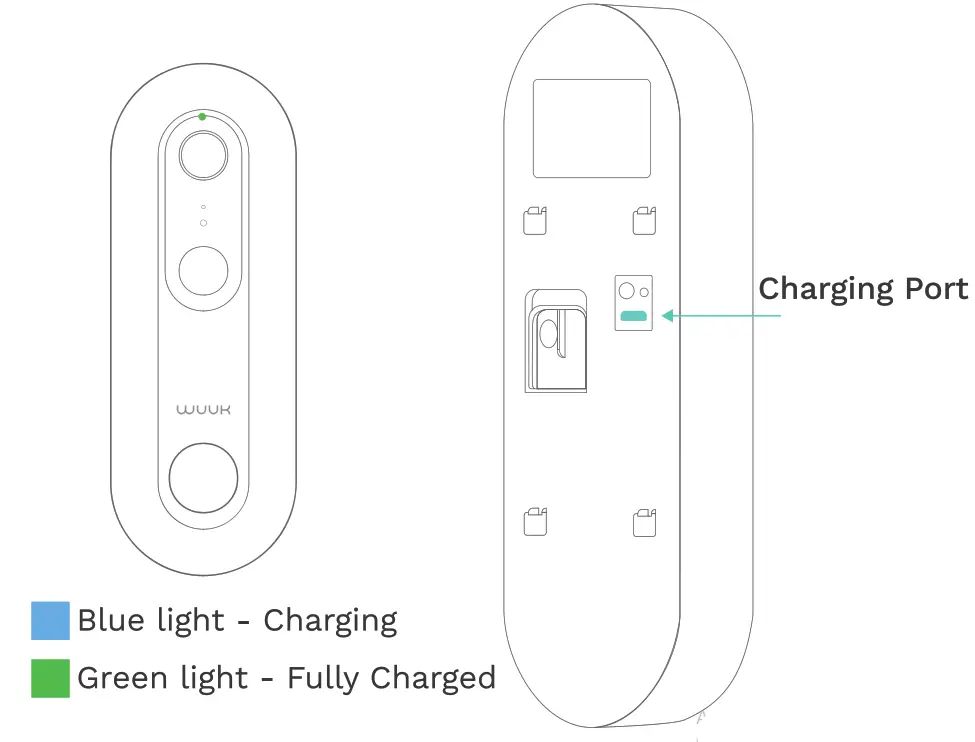
<p><strong>First, fully charge the built-in battery in the WUUK Doorbell.</strong><br />
Plugging it into a power source using the provided charging cable that connects the doorbell from a Micro USB charging port at the back of the doorbell.<br />
<img decoding="async" src="https://usemanuals.com/wp-content/uploads/2023/08/wuuklabs-Smart-Doorbell-CHARGE.webp" /></p>
<p>If you can’t wait to play with your WUUK Doorbell, go ahead and set it up. But, we recommend fully charging it before first-time use.</p>
<h4>Quick Installation</h4>
<h5>Power Up Your Chime</h5>
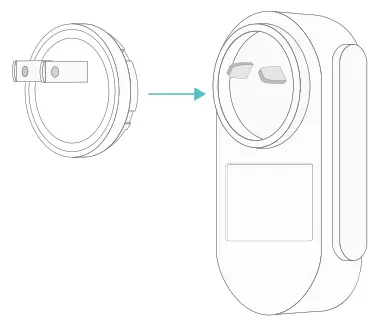
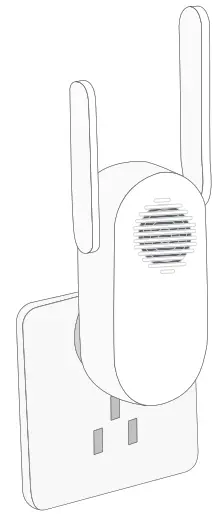
<p>&lt;1&gt; Link the power plug to the WUUK Chime<br />
<img decoding="async" src="https://usemanuals.com/wp-content/uploads/2023/08/wuuklabs-Smart-Doorbell-POWER-UP-2.webp" />&lt;2&gt; Plug into a power outlet that is between 100V ~ 240V</p>
<p>* If the power plug doesn’t fit your country’s power outlet standard, you will need a power plug adapter.</p>
<h4>Choose The Way You Want to Install The Doorbell</h4>
<p>Metals, glass, and ceramics, plastics, and PVC<br />
<strong>YES- 3M VHB Tape (P4-P8)</strong></p>
<p>Fibered surfaces such as particleboard, wood, and paints<br />
Maybe – 3M VHB Tape<br />
<strong>YES Screw In (P4, P5, P6, P13)</strong></p>
<p>Porous &amp; uneven surfaces such as concrete, stone, limestone, brick<br />
Maybe – 3M VHB Tape<br />
<strong>YES – Screw-In with anchors (P4, P5, P6, P13)</strong></p>
<p>Gabion, rubber, leather, peel metope<br />
NO – 3M VHB Tape<br />
<strong>YES – Screw-In</strong><br />
<strong>YES-Screw In with anchors</strong></p>
<h4>Better Prepare The Surface for Strong Bond</h4>
<p><strong>The surface must be dry.<br />
</strong><strong>Remove heavy levels of dirt or oxide from </strong><strong>metals or paints (e.g. galvanized steel).</strong></p>
<p>For maximum bond strength, we recommend thoroughly cleaning the surface <strong>with a 50:50 </strong><strong>mixture of isopropyl alcohol and water.<br />
</strong><strong>Ideal tape application is accomplished </strong><strong>when the temperature is between 70°F and </strong><strong>100°F (21°C and 38°C).</strong></p>
<p><strong>Initial </strong>tape application to surfaces at temperatures <strong>below 50°F (10°C) is </strong><strong>not recommended. If you are in a cold </strong><strong>area, warm up the tape by using a hairdry­</strong><strong>er or other tools.</strong></p>
<h5>Porous Surfaces</h5>
<p>Rough, porous, or fibered materials such as wood, particleboard, cement, etc. have an open surface and require sealing to provide a unified surface for tape bonding. Common sealing materials would include paint, varnish, or other hard surface coatings.</p>
<h5>Abrasion Surfaces</h5>
<p>For some surfaces, abrading using a Scotch-Brite Hand Pad or power palm sander with a fine-grit will help prepare the surface for better adhesive bonding. Abrading a surface can serve several functions: Smooth a surface to obtain more flatness, allowing improved contact area.<br />
Create an additional surface area that can increase adhesion.</p>
<h4>About The 3MTM VHBTM Tape, We Choose to Use on The WUUK Doorbell</h4>
<p>VHB stands for Very High Bonding tape. 3MTM VHBTM tapes have been used extensively throughout manufacturing industries since the 1980s. The viscous liquid properties help the adhesive within the VHB tape flows into every microscopic surface to provide a seal against environmental conditions and a high-performance bond. In many situations, VHB tape can replace rivets, welds, screws, and other forms of mechanical fasteners.</p>
<p><strong>Reasons why WUUK Labs choose to apply </strong><strong>3MTM VHBTM tapes as a way of installation<br />
</strong>Quick and simple to apply, and used without extensive specialized training.<br />
Superior long-term durability. Cut costs and increase manufacturing efficiency.<br />
Moisture resistance. Survive extreme high temperatures. Short term resistance: 200 <strong>°</strong>F (93 °C) Long term resistance: 158 °F (70 °C)</p>
<h4><strong>1 </strong></h4>
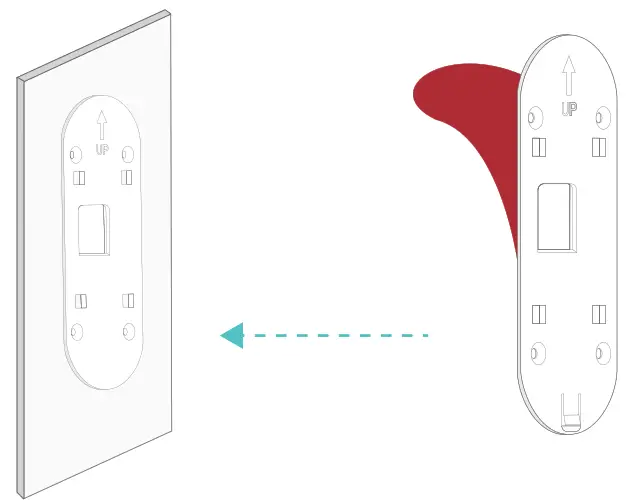
<p>&lt;1&gt; Peel off the red foil that has the 3M VHB texts on it, and attach the backplate to where you want to sit your doorbell.<br />
&lt;2&gt; Press hard on the backplate for 5 seconds.<br />
&lt;3&gt; Let it be there and dwell for at least 24hours so the 3M VHB tape can sink into the surface and build the strongest bond.</p>
<p><img decoding="async" src="https://usemanuals.com/wp-content/uploads/2023/08/wuuklabs-Smart-Doorbell-INSTALATION.webp" />* 72 hours are recommended.<br />
If you are applying the 1 Minute Installation, for final steps, go to P14.</p>
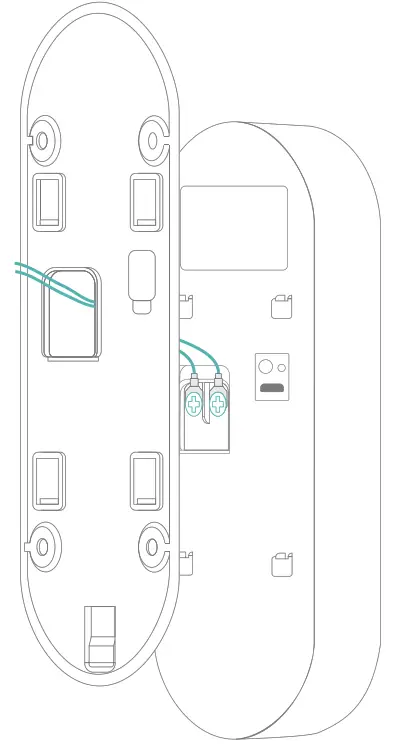
<p>(If you choose to use the battery for power, please skip this page)<br />
We highly recommend users who use the doorbell in cold weather areas (-4°F / -20°C) wire the device in order to keep the battery working properly.<br />
(Optional) Hardwire the WUUK Doorbell for Power Make sure the wires go through the backplate.</p>
<p><img decoding="async" src="https://usemanuals.com/wp-content/uploads/2023/08/wuuklabs-Smart-Doorbell-INSTALATION-2.webp" /></p>
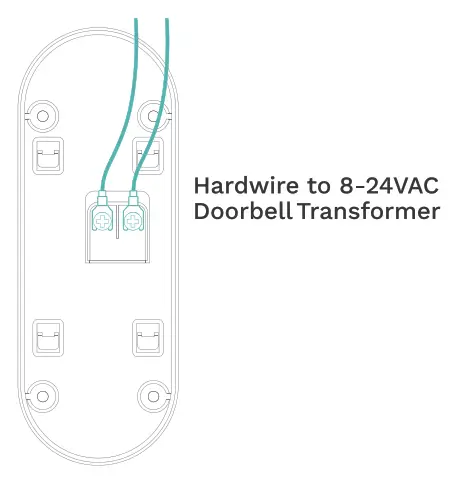
<h4>Connect The Wires</h4>
<p>Connect the wires coming out of your wall to the screws on the back of your WUUK Doorbell. Either wire can connect to either screw. The order doesn’t matter.<br />
<img decoding="async" src="https://usemanuals.com/wp-content/uploads/2023/08/wuuklabs-Smart-Doorbell-CONNECT.webp" /></p>
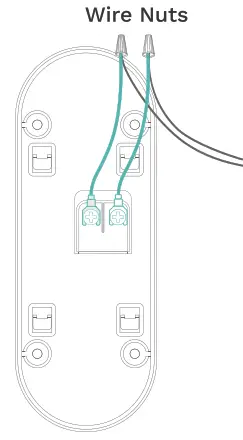
<p><strong>(Optional) Attach The Wire Extensions</strong></p>
<p>If you have trouble connecting the wires coming out of your wall to the back of your WUUK Doorbell, use the provided wire extensions and wire nuts.</p>
<p><img decoding="async" src="https://usemanuals.com/wp-content/uploads/2023/08/wuuklabs-Smart-Doorbell-NUTS.webp" /></p>
<p>Feed all the wires, and the wire nuts, if you used them, into your wall.<br />
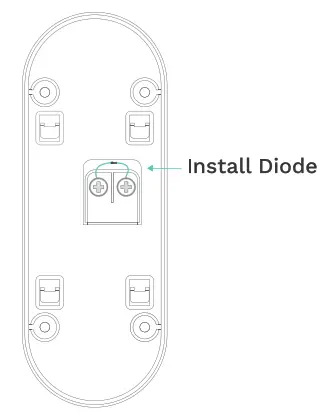
If you’re wiring your WUUK Doorbell to a digital doorbell – you’ll know it’s digital if it plays a synthesized melody – then install the included diode.<br />
<img decoding="async" src="https://usemanuals.com/wp-content/uploads/2023/08/wuuklabs-Smart-Doorbell-INSTALL.webp" /></p>
<p>If your existing doorbell is mechanical, DO NOT use the diode, as it can damage your existing doorbell.<br />
Not sure? Check wuuklabs.com/diode</p>
<p><strong>(If you install the WUUK Doorbell on metals, glass and ceramics, plastics and PVC; Or choose to apply the 3M VHB tape as the installation method, please skip this page)</strong></p>
<p><strong>(Optional) Screw On</strong></p>
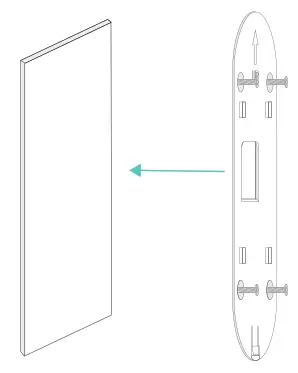
<p>For installing on porous &amp; uneven surfaces such as concrete, stone, limestone, brick; Or you choose to install this way.<br />
<img decoding="async" src="https://usemanuals.com/wp-content/uploads/2023/08/wuuklabs-Smart-Doorbell-OPTION.webp" /><strong>Install anchors – on stucco, brick, or concrete </strong><br />
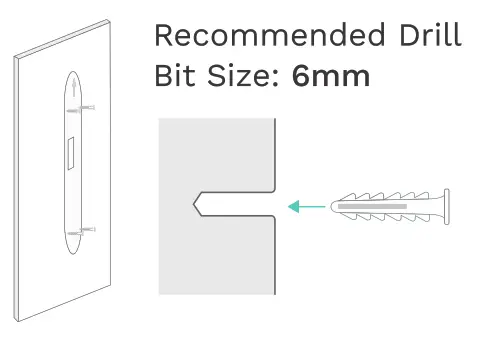
Mark 4 drill holes using the locating pad sticker. Use a bit to drill holes in your wall and insert the anchors.<br />
<img decoding="async" src="https://usemanuals.com/wp-content/uploads/2023/08/wuuklabs-Smart-Doorbell-DRILL.webp" /><strong>Screw it in – on particleboard, wood, and paints</strong></p>
<p>Secure your WUUK Doorbell backplate on the wall using the four screws provided.</p>
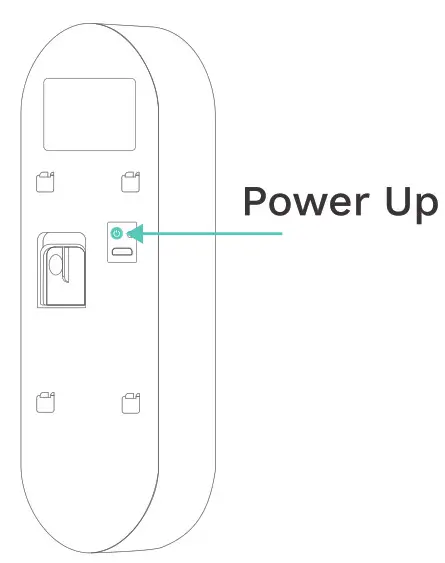
<p><img decoding="async" src="https://usemanuals.com/wp-content/uploads/2023/08/wuuklabs-Smart.webp" />Power up the WUUK Doorbell, and hang the WUUK Doorbell onto the wall mount.</p>
<p>Match the four hooks on the back with the four locks on the backplate, and slide down. You will hear a slight clicking sound.</p>
<p><img decoding="async" src="https://usemanuals.com/wp-content/uploads/2023/08/wuuklabs-Smart-Doorbell-CHARGE-2.webp" />You are done!</p>
<h4>Charge The WUUK Doorbell</h4>
<p>Before removing the doorbell, please make sure you turn off the Anti-theft Alert in the WUUK app.<br />
Remove the WUUK Doorbell from the backplate for charging. Insert the releas­ing pin from the bottom of the doorbell, lift the pin handle a little bit, which helps to push the lock on the backplate to release, while sliding up the doorbell.</p>
<p><img decoding="async" src="https://usemanuals.com/wp-content/uploads/2023/08/wuuklabs-Smart-Doorbell-INSERT.webp" /></p>
<p><strong>Continue to set up your WUUK Doorbell in the app.</strong></p>
<p>Having troubles?</p>
<p><a href="mailto:hello@wuvklabs.com">hello@wuvklabs.com</a><br />
<a href="http://support.wuuklabs.com/" target="_blank" rel="noopener">support.wuuklabs.com</a></p>
<p>Connect with us and join the WUUK online community<br />
<a href="https://www.facebook.com/WUUKLabs/" target="_blank" rel="noopener">www.facebook.com/WUUKLabs/</a><br />
<a href="https://twitter.com/DoorbellWuuk" target="_blank" rel="noopener">twitter.com/DoorbellWuuk</a></p>
<form id="commentform" class="comment-form" action="https://manuals.plus/wp-comments-post.php" method="post" novalidate="">
<p class="form-submit">
</form>
]]></content:encoded>


			</item>
	</channel>
</rss>

<!--
Performance optimized by W3 Total Cache. Learn more: https://www.boldgrid.com/w3-total-cache/

Page Caching using Disk: Enhanced 

Served from: usemanuals.com @ 2026-06-09 18:20:12 by W3 Total Cache
-->