<?xml version="1.0" encoding="UTF-8"?><rss version="2.0"
	xmlns:content="http://purl.org/rss/1.0/modules/content/"
	xmlns:wfw="http://wellformedweb.org/CommentAPI/"
	xmlns:dc="http://purl.org/dc/elements/1.1/"
	xmlns:atom="http://www.w3.org/2005/Atom"
	xmlns:sy="http://purl.org/rss/1.0/modules/syndication/"
	xmlns:slash="http://purl.org/rss/1.0/modules/slash/"
	>

<channel>
	<title>Nu Republic &#8211; UseManuals</title>
	<atom:link href="http://usemanuals.com/nu-republic/feed/" rel="self" type="application/rss+xml" />
	<link>https://usemanuals.com</link>
	<description>Owner&#039;s manuals for all sorts of products</description>
	<lastBuildDate>Fri, 28 Jul 2023 10:46:57 +0000</lastBuildDate>
	<language>en-US</language>
	<sy:updatePeriod>
	hourly	</sy:updatePeriod>
	<sy:updateFrequency>
	1	</sy:updateFrequency>
	<generator>https://wordpress.org/?v=6.7.2</generator>

<image>
	<url>https://usemanuals.com/wp-content/uploads/2025/02/favicon-32x32-2.png</url>
	<title>Nu Republic &#8211; UseManuals</title>
	<link>https://usemanuals.com</link>
	<width>32</width>
	<height>32</height>
</image> 
	<item>
		<title>NU REPUBLIC True Wireless Earphone NU512 Manual</title>
		<link>https://usemanuals.com/nu-republic/earphone-nu512/</link>
		
		<dc:creator><![CDATA[ItsManual]]></dc:creator>
		<pubDate>Fri, 23 Jun 2023 06:19:56 +0000</pubDate>
				<category><![CDATA[Nu Republic]]></category>
		<guid isPermaLink="false">https://usemanuals.com/?p=114086</guid>

					<description><![CDATA[FLO  TRUE WIRELESS EARPHONES USER MANUAL  MODEL NO: NU512 INTRODUCTION TO EARPHONES Thank you for purchasing Flo True Wireless Earphones. This guide is provided to help you get started quickly with your true wireless earphones: please read it carefully and save it for your future reference. SAFETY INSTRUCTIONS Read the instruction manual carefully and completely before using the product. PREVENTING DAMAGE TO HEALTH AND PRODUCT Protect your hearing from high volume levels. Permanent hearing damage may occur when earphones are used at high volume for prolonged periods of time. Don’t charge them with high voltage adaptors. Don’t allow children or infirm to play with your earphones without adult supervision. Don’t use the product in an environment that requires special attention (e.g. in traffic). Don’t use earphones near water. Clean using a dry or slightly moist cloth. Store earphones at room temperature. Don’t use in extremely dry environments as it leads to static discharge during usage. Don’t expose your earphones to temperatures above 40 degrees. Keep out of direct sunlight. Don’t attempt to repair the product yourself. It will void the product warranty. Don’t drop, puncture or expose your earphones to excessive trauma. Always press all buttons carefully. Don’t mishandle your earphones. Don’t place near object generating a strong magnetic field. Use only the supplied charging cable. Unplug the device when not in use or during a lightning storm. Don’t expose earphones to excessive heat or fire. INTENDED USE/LIABILITY Nu Republic does not accept liability for damage arising from improper use or misuse of this product and its attached accessories. USAGE INSTRUCTIONS Answer The Cal- Click on the L/R ear Hang Up The Call-Click on the L/R ear Last Song- Double-Click The auxiliary ear switch Next Song- Double-Click The Main Ear Switch ► Play Song- Click on the LIP ear Pause Song- Click on the L/R ea’ Volume Triple Click on the main ear — – Volume- Click on the secondary ear Siri- Long Press L/R ear for 1 Second On/Off- Long Press L/R ear for 3 Seconds INCLUDED WITH EARPHONES Flo True Wireless Earphones 3 Sets of Eargels in 3 sizes Type-C Charging Cable Charging/ Storage Case -User Manual UNDERSTANDING THE EARPHONES A.Touch Controls B.Indicator Light C.Charging Port D.Silicone Earphones Cap E. Sound Hole A. Left Ear B. Right Ear C. Charging Point D. Type-C Chargin PAIRING YOUR EARPHONES Turn on the two earphones (with a power-on prompt), and after about 5 seconds, the two earphones will automatically pair (with a pairing prompt). After the pairing is successful, the red and blue lights alternately flash for the main ear. and the off light is the secondary ear, Then turn on the Bluetooth device of the mobile phone, search for the pairing name and click Connect to use the pairing mode. (After the connection is successful and in the working state, neither headset lights up) SHUTTING DOWN YOUR EARPHONES Put the headset into the charging box. At this time, the indicator light of the headset is always red, the indicator light of the charging box is Press and hold the key of the two headphones at the same time for about 3 seconds. At this time, the red light is on to turn off the headphones; When the headset is disconnected from the phone for more than 5 minutes, the headset will automatically turn off; EARPHONES MASTER-SLAVE FREE SWITCHING After the earphones are successfully paired with the mobile phone for the first time, you can use any single ear or both ears when you use it again. The earphone will automatically switch between the primary and the secondary ear without re-pairing. After the Left and right earphones are In the TWS pairing mode. double-click any pair of earphones to pair, and double-click the earphones to make it the main earphone. After the pairing is successful, red and blue lights will start alternately flashing. After pairing the left and right earphones with double-click any of the earphones again to clear the TWS pairing. If the left and right earphones cannot be paired. please clear the pair of left and right earphones first. and then re-do the TWS pairing operation. USING YOUR EARPHONES AGAIN Takeout the single earphones or both earphones from the charging case, and the earphone will automatically connect back to the last time the phone is connected If the earphones are powered off or not in the charging case, put the earphones back into the charging case to activate them and then take them out again: or press and hold the earphones multifunction key to turn them on. the earphones will automatically connect back with the mobile phone. CHARGING YOUR EARPHONES To charge the earphones: Put the earphones into the charging case separately. the red light of the earphones and the blue light of the charging case will always be turned on. indicating that the charging is in progress. and the indicator light will be turned off after the charging is completed.  To charge the charging case: Insert the Type USB c: charging cable to charge the charging case. During the charging process, the red indicator light flashes, and the red light will remain on after the char4ng is completed SPECIFICATIONS Bluetooth Version 5.0 Bluetooth Protocol HSP, H FP, A2DP, AVRCP Working Distance 10m / 33Ft Music Working Time 4-5 hours’ Standby Time 130 hours’ Charging Time 1 hour’ Earbuds Battery Capacity 50mAh Charging Case Battery Capacity 300rnAh Raying System Os and Android Support Function Hands-free calling,Sri Vote antra Google Voice Assistant Frequency 20Hz-20KHz Earbuds Weight 42 g Charging Case Weight 29 g Charging Case Charging Port Type-C Input Specifications 5V 500mA Charging Time for Earphones 3 Times Earbud Product Size 22SrnmX16rnmX 24mrn Charging Case Product Size 805mmX39mmX 29mm PRODUCT FEATURES Support Al intelligent voice function, support voice assistant function of iOS and android In-ear design, comfortable and not easy to fall One-touch button design, more convenient than other buttons on TWS earphones. Equipped with charging case. When the mobile phone has an incoming call, the headset is automatically turned on and answered when it is picked up from charging Support iOS system and Android system power Hi-fi sound effect with built-in mm neodymium drivers. Pair automatically after taking out from charging Notes: If you do not charge the earphones for a long time, the battery life will be greatly shortened. It is recommended that you charge the earphones at least once a month. CHOOSING PERFECT EAR TIPS It provides ear-tips in small/medium/large three sizes, made from premium grade rubber. Select an ear-tip that provides the best fit and sound isolation. It should be easy to insert, fit comfortably, and easy to remove. DISCARDING THE EARPHONES For proper treatment to avoid harmful effects on human health and the environment, please contact your local municipality, your waste disposal service or the point of sale where you purchased the items. Nu Republic warrants that the product at the time of its original purchase is free of defects in material and workmanship. This warranty is subject to the following terms The warranty is given only to the original purchaser of the product (“customer”) The warranty will be applicable for 6 months from the date of original purchase or 18 months from the date of import as mentioned in the import sticker on the box whichever is earlier. The customer has to present the proof of payment/ invoice for claiming any warranty. For the entire warranty period. Nu Republic or its authorized representative will at their discretion repair or replace the product. The details of the service locations can be taken from our service helpline. It is the responsibility of the Customer to bring the product to Nu Republic Service Location at his/her own risk and expenses. For any product repaired or replaced during the warranty period, the repaired or replaced product shall continue being within the period of the original product. The warranty will not be applicable under the following circumstances: The product code/serial number, water indicator or warranty seal has been removed, erased. defaced altered or is illegible. Deterioration of the product due to normal wear and tear. Use other than in accordance with the user’s rough handling. ingression of/exposure to any kind of liquid (water. sweat. beverages. oils etc.) exposure to moisture. dampness or exposure to extreme environmental conditions. The warranty will also not cover any physical damage to the surface of the product including but not limited to scratches on the body parts. As defects caused by the fact that the battery has been short-circuited or by the fact that the seals of the casing or any evidence of tampering or the product is used for equipment other than for which it is certified. Any claim under the warranty is subject to notification to Nu Republic. For the alleged defect within a reasonable time of its occurrence and in no event not later than the expiry of the warranty period. Nu Republic / authorized partner will not be responsible for any kind of losses direct or indirect. Nu Republic’s obligation under this warranty shall be limited to repair or providing replacement of parts only the maximum claim entertained by Nu Republic will be subject to the maximum retail price of the product or purchase price (as per invoice) whichever one is lower. Note: Check out our website www.nurepublic.co for existing offers &#38; extended warranty. In an event of any unforeseen circumstances, there is the unavailability of certain spare parts, prevailing depreciation rules will be binding on the purchaser to accept as a commercial solution in lieu of repairs. Helpline Number: +91-8826257630 Working Hours: Monday to Friday 10:00 AM- 5:30 PM (except national and public holidays) Email: hello@alchemie.co [...]<p><a class="btn btn-secondary understrap-read-more-link" href="https://usemanuals.com/nu-republic/earphone-nu512/">Read More...</a></p>]]></description>

										<content:encoded><![CDATA[<p><img decoding="async" src="https://usemanuals.com/wp-content/uploads/2023/06/REPUBLIC-logo-1.webp" /></p>
<p><strong>FLO </strong><br />
<strong>TRUE WIRELESS EARPHONES</strong></p>
<p><strong>USER MANUAL </strong><br />
<strong>MODEL NO: NU512</strong></p>
<h4><strong>INTRODUCTION TO EARPHONES</strong></h4>
<p>Thank you for purchasing Flo True Wireless Earphones. This guide is provided to help you get started quickly with your true wireless earphones: please read it carefully and save it for your future reference.</p>
<h4><strong>SAFETY INSTRUCTIONS</strong></h4>
<p>Read the instruction manual carefully and completely before using the product.</p>
<h4><strong>PREVENTING DAMAGE TO HEALTH AND PRODUCT</strong></h4>
<ul>
<li>Protect your hearing from high volume levels. Permanent hearing damage may occur when earphones are used at high volume for prolonged periods of time.</li>
<li>Don’t charge them with high voltage adaptors.</li>
<li>Don’t allow children or infirm to play with your earphones without adult supervision.</li>
<li>Don’t use the product in an environment that requires special attention (e.g. in traffic).</li>
<li>Don’t use earphones near water. Clean using a dry or slightly moist cloth.</li>
<li>Store earphones at room temperature.</li>
<li>Don’t use in extremely dry environments as it leads to static discharge during usage.</li>
<li>Don’t expose your earphones to temperatures above 40 degrees. Keep out of direct sunlight.</li>
<li>Don’t attempt to repair the product yourself. It will void the product warranty.</li>
<li>Don’t drop, puncture or expose your earphones to excessive trauma.</li>
<li>Always press all buttons carefully. Don’t mishandle your earphones.</li>
<li>Don’t place near object generating a strong magnetic field.</li>
<li>Use only the supplied charging cable. Unplug the device when not in use or during a lightning storm.</li>
<li>Don’t expose earphones to excessive heat or fire. <strong>INTENDED USE/LIABILITY</strong></li>
</ul>
<p>Nu Republic does not accept liability for damage arising from improper use or misuse of this product and its attached accessories.</p>
<h4><strong>USAGE INSTRUCTIONS</strong></h4>
<p><img decoding="async" src="https://usemanuals.com/wp-content/uploads/2023/06/NU-REPUBLIC-True-Wireless-Earphone.webp" /></p>
<p><img decoding="async" src="https://usemanuals.com/wp-content/uploads/2023/06/Answer.webp" />Answer The Cal- Click on the L/R ear</p>
<p><img decoding="async" src="https://usemanuals.com/wp-content/uploads/2023/06/Hung-up.webp" /> Hang Up The Call-Click on the L/R ear</p>
<p><img decoding="async" src="https://usemanuals.com/wp-content/uploads/2023/06/Last.webp" /> Last Song- Double-Click The auxiliary ear switch<br />
<img decoding="async" src="https://usemanuals.com/wp-content/uploads/2023/06/Next.webp" />Next Song- Double-Click The Main <em>Ear </em>Switch</p>
<p>► Play Song- Click on the LIP ear</p>
<p><img decoding="async" src="https://usemanuals.com/wp-content/uploads/2023/06/Pause.webp" />Pause Song- Click on the L/R ea’</p>
<p><img decoding="async" src="https://usemanuals.com/wp-content/uploads/2023/06/volume-1.webp" />Volume Triple Click on the main ear<br />
— – Volume- Click on the secondary ear<br />
<img decoding="async" src="https://usemanuals.com/wp-content/uploads/2023/06/siri.webp" /> Siri- Long Press L/R ear for 1 Second</p>
<p><img decoding="async" src="https://usemanuals.com/wp-content/uploads/2023/06/on-off-1.webp" /> On/Off- Long Press L/R ear for 3 Seconds</p>
<h4><strong>INCLUDED WITH EARPHONES</strong></h4>
<ul>
<li>Flo True Wireless Earphones</li>
<li>3 Sets of Eargels in 3 sizes</li>
<li>Type-C Charging Cable</li>
<li>Charging/ Storage Case -User Manual</li>
</ul>
<h4>UNDERSTANDING THE EARPHONES</h4>
<p><img decoding="async" src="https://usemanuals.com/wp-content/uploads/2023/06/NU-REPUBLIC-True-Wireless-Earphone-parts.webp" /></p>
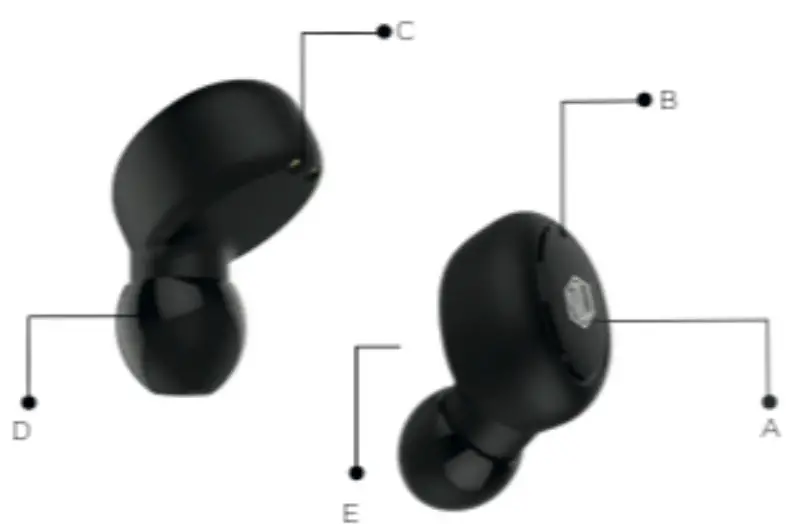
<p>A.Touch Controls<br />
B.Indicator Light<br />
C.Charging Port<br />
D.Silicone Earphones Cap<br />
E. Sound Hole</p>
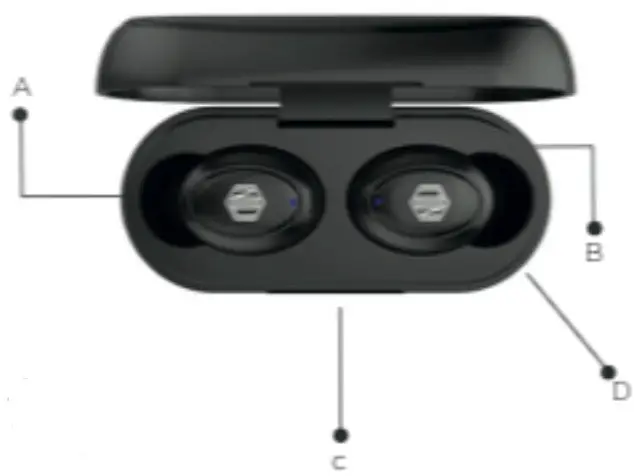
<p><img decoding="async" src="https://usemanuals.com/wp-content/uploads/2023/06/NU-REPUBLIC-True-Wireless-Earphone-parts-13.webp" />A. Left Ear<br />
B. Right Ear<br />
C. Charging Point<br />
D. Type-C Chargin</p>
<h4><strong>PAIRING YOUR EARPHONES</strong></h4>
<p>Turn on the two earphones (with a power-on prompt), and after about 5 seconds, the two earphones will automatically pair (with a pairing prompt). After the pairing is successful, the red and blue lights alternately flash for the main ear. and the off light is the secondary ear, Then turn on the Bluetooth device of the mobile phone, search for the pairing name and click Connect to use the pairing mode. (After the connection is successful and in the working state, neither headset lights up)</p>
<h4><strong>SHUTTING DOWN YOUR EARPHONES</strong></h4>
<ul>
<li>Put the headset into the charging box. At this time, the indicator light of the headset is always red, the indicator light of the charging box is</li>
<li>Press and hold the key of the two headphones at the same time for about 3 seconds. At this time, the red light is on to turn off the headphones;</li>
<li>When the headset is disconnected from the phone for more than 5 minutes, the headset will automatically turn off;</li>
</ul>
<h4><strong>EARPHONES MASTER-SLAVE FREE SWITCHING</strong></h4>
<ol>
<li>After the earphones are successfully paired with the mobile phone for the first time, you can use any single ear or both ears when you use it again. The earphone will automatically switch between the primary and the secondary ear without re-pairing.</li>
<li>After the Left and right earphones are In the TWS pairing mode. double-click any pair of earphones to pair, and double-click the earphones to make it the main earphone. After the pairing is successful, red and blue lights will start alternately flashing.</li>
<li>After pairing the left and right earphones with double-click any of the earphones again to clear the TWS pairing. If the left and right earphones cannot be paired. please clear the pair of left and right earphones first. and then re-do the TWS pairing operation.</li>
</ol>
<h4><strong>USING YOUR EARPHONES AGAIN</strong></h4>
<ol>
<li>Takeout the single earphones or both earphones from the charging case, and the earphone will automatically connect back to the last time the phone is connected</li>
<li>If the earphones are powered off or not in the charging case, put the earphones back into the charging case to activate them and then take them out again: or press and hold the earphones multifunction key to turn them on. the earphones will automatically connect back with the mobile phone.</li>
</ol>
<h4><strong>CHARGING YOUR EARPHONES</strong></h4>
<ol>
<li>To charge the earphones: Put the earphones into the charging case separately. the red light of the earphones and the blue light of the charging case will always be turned on. indicating that the charging is in progress. and the indicator light will be turned off after the charging is completed.</li>
<li><strong> </strong>To charge the charging case: Insert the Type USB c: charging cable to charge the charging case. During the charging process, the red indicator light flashes, and the red light will remain on after the char4ng is completed</li>
</ol>
<h4><strong>SPECIFICATIONS</strong></h4>
<table width="1073">
<tbody>
<tr>
<td width="250">Bluetooth Version</td>
<td width="169">5.0</td>
</tr>
<tr>
<td width="250">Bluetooth Protocol</td>
<td width="169">HSP, H FP, A2DP, AVRCP</td>
</tr>
<tr>
<td width="250">Working Distance</td>
<td width="169">10m / 33Ft</td>
</tr>
<tr>
<td width="250">Music Working Time</td>
<td width="169">4-5 hours’</td>
</tr>
<tr>
<td width="250">Standby Time</td>
<td width="169">130 hours’</td>
</tr>
<tr>
<td width="250">Charging Time</td>
<td width="169">1 hour’</td>
</tr>
<tr>
<td width="250">Earbuds Battery Capacity</td>
<td width="169">50mAh</td>
</tr>
<tr>
<td width="250">Charging Case Battery Capacity</td>
<td width="169">300rnAh</td>
</tr>
<tr>
<td width="250">Raying System</td>
<td width="169">Os and Android</td>
</tr>
<tr>
<td width="250">Support Function</td>
<td width="169">Hands-free calling,Sri Vote antra Google Voice Assistant</td>
</tr>
<tr>
<td width="250">Frequency</td>
<td width="169">20Hz-20KHz</td>
</tr>
<tr>
<td width="250">Earbuds Weight</td>
<td width="169">42 g</td>
</tr>
<tr>
<td width="250">Charging Case Weight</td>
<td width="169">29 g</td>
</tr>
<tr>
<td width="250">Charging Case Charging Port</td>
<td width="169">Type-C</td>
</tr>
<tr>
<td width="250">Input Specifications</td>
<td width="169">5V 500mA</td>
</tr>
<tr>
<td width="250">Charging Time for Earphones</td>
<td width="169">3 Times</td>
</tr>
<tr>
<td width="250">Earbud Product Size</td>
<td width="169">22SrnmX16rnmX 24mrn</td>
</tr>
<tr>
<td width="250">Charging Case Product Size</td>
<td width="169"><sup>805</sup>mmX<sup>39</sup>mmX 29mm</td>
</tr>
</tbody>
</table>
<h4><strong>PRODUCT FEATURES</strong></h4>
<ol>
<li>Support Al intelligent voice function, support voice assistant function of iOS and android</li>
<li>In-ear design, comfortable and not easy to fall</li>
<li>One-touch button design, more convenient than other buttons on TWS earphones.</li>
<li>Equipped with charging case.</li>
<li>When the mobile phone has an incoming call, the headset is automatically turned on and answered when it is picked up from charging</li>
<li>Support iOS system and Android system power</li>
<li>Hi-fi sound effect with <strong>built-in </strong>mm neodymium drivers.</li>
<li>Pair automatically after taking out from charging</li>
</ol>
<p><strong>Notes:</strong></p>
<p>If you do not charge the earphones for a long time, the battery life will be greatly shortened. It is recommended that you charge the earphones at least once a month.</p>
<h4><strong>CHOOSING PERFECT EAR TIPS</strong></h4>
<p>It provides ear-tips in small/medium/large three sizes, made from premium grade rubber.<br />
Select an ear-tip that provides the best fit and sound isolation. It should be easy to insert, fit comfortably, and easy to remove.</p>
<h4><strong>DISCARDING THE EARPHONES</strong></h4>
<p>For proper treatment to avoid harmful effects on human health and the environment, please contact your local municipality, your waste disposal service or the point of sale where you purchased the items.</p>
<p>Nu Republic warrants that the product at the time of its original purchase is free of defects in material and workmanship.</p>
<p>This warranty is subject to the following terms</p>
<ul>
<li>The warranty is given only to the original purchaser of the product (“customer”)</li>
<li>The warranty will be applicable for 6 months from the date of original purchase or 18 months from the date of import as mentioned in the import sticker on the box whichever is earlier. The customer has to present the proof of payment/ invoice for claiming any warranty.</li>
<li>For the entire warranty period. Nu Republic or its authorized representative will at their discretion repair or replace the product.</li>
<li>The details of the service locations can be taken from our service helpline. It is the responsibility of the Customer to bring the product to Nu Republic Service Location at his/her own risk and expenses.</li>
</ul>
<p>For any product repaired or replaced during the warranty period, the repaired or replaced product shall continue being within the period of the original product.<br />
The warranty will not be applicable under the following circumstances:</p>
<ol>
<li>The product code/serial number, water indicator or warranty seal has been removed, erased. defaced altered or is illegible.</li>
<li>Deterioration of the product due to normal wear and tear.</li>
<li>Use other than in accordance with the user’s rough handling. ingression of/exposure to any kind of liquid (water. sweat. beverages. oils etc.) exposure to moisture. dampness or exposure to extreme environmental conditions.</li>
<li>The warranty will also not cover any physical damage to the surface of the product including but not limited to scratches on the body parts.</li>
<li>As defects caused by the fact that the battery has been short-circuited or by the fact that the seals of the casing or any evidence of tampering or the product is used for equipment other than for which it is certified<strong>.</strong></li>
</ol>
<p>Any claim under the warranty is subject to notification to Nu Republic. For the alleged defect within a reasonable time of its occurrence and in no event not later than the expiry of the warranty period.<br />
Nu Republic / authorized partner will not be responsible for any kind of losses direct or indirect.<br />
Nu Republic’s obligation under this warranty shall be limited to repair or providing replacement of parts only the maximum claim entertained by Nu Republic will be subject to the maximum retail price of the product or purchase price (as per invoice) whichever one is lower.<br />
Note: Check out our website <a href="http://www.nurepublic.co/" target="_blank" rel="noopener">www.nurepublic.co</a> for existing offers &amp; extended warranty.<br />
In an event of any unforeseen circumstances, there is the unavailability of certain spare parts, prevailing depreciation rules will be binding on the purchaser to accept as a commercial solution in lieu of repairs.<br />
Helpline Number: +91-8826257630<br />
Working Hours: Monday to Friday 10:00 AM- 5:30 PM (except national and public holidays)</p>
<p><img decoding="async" src="https://usemanuals.com/wp-content/uploads/2023/06/REPUBLIC-logo-1-1.webp" /></p>
<p><strong>Email: <a href="mailto:hello@alchemie.co">hello@alchemie.co</a></strong></p>
<form id="commentform" class="comment-form" action="https://manuals.plus/wp-comments-post.php" method="post" novalidate="">
<p class="form-submit">
</form>
]]></content:encoded>


			</item>
		<item>
		<title>NU REPUBLIC Bluetooth Wireless Earphone With mic JAXX3/JAXX4 Manual</title>
		<link>https://usemanuals.com/nu-republic/earphone-jaxx3/</link>
		
		<dc:creator><![CDATA[ItsManual]]></dc:creator>
		<pubDate>Fri, 28 Jul 2023 10:46:57 +0000</pubDate>
				<category><![CDATA[Nu Republic]]></category>
		<guid isPermaLink="false">https://usemanuals.com/?p=179980</guid>

					<description><![CDATA[USER MANUAL  BLUETOOTH WIRELESS EARPHONES JAXX3/JAXX4 INTRODUCTION TO EARPHONES Thank you for purchasing Bluetooth Wireless Earphones. This guide is provided to help you get started quickly with your wireless earphones; please read it carefully and save it for your future reference. SAFETY INSTRUCTIONS Read the instruction manual carefully and completely before using the product. PREVENTING DAMAGE TO HEALTH AND PRODUCT Protect your hearing from high volume levels. Permanent hearing damage may occur when earphones are used at high volume for prolonged periods of time. Don’t charge them with high voltage adaptors. Don’t allow children or infirm to play with your earphones without adult supervision. Don’t use the product in an environment that requires special attention (e.g. in traffic). Don’t use earphones near water. Clean using a dry or slightly moist cloth. Store earphones at room temperature. Don’t use in extremely dry environments as it leads to static discharge during usage. Don’t expose your earphones to temperatures above 40 degrees. Keep out of direct sunlight. Don’t attempt to repair the product yourself. It will void the product warranty. Don’t drop, puncture or expose your earphones to excessive trauma. Always press all buttons carefully. Don’t mishandle your earphones. Don’t place near objects generating a strong magnetic field. Use only the supplied charging cable. Unplug the device when not in use or during a lightning storm. Don’t expose earphones to excessive heat or fire. INTENDED USE/LIABILITY INTENDED USE/LIABILITY Nu Republic does not accept liability for damage arising from improper use or misuse of this product and it’s attached accessories. UNDERSTANDING THE EARPHONES Key Function: Volume Up: Short press for the previous song; Long press to increase the volume Volume Down: Short press for next song: Long press to decrease volume Power/Multifunction Button: Power on/off, answer/reject call, play/pause music INCLUDED WITH EARPHONES Bluetooth Wireless Earphones 3 Sets of Eargels in 3 sizes USB charging Cable Storage Case (Only for Jaxx 3 not for jaxx4) User Manual WEARING THE EARPHONES Carefully wear the earphones with L mark in your left ear, and the one with a right mark in your right ear. Twist the earphones up into the ear canal while inserting, until outside noise is blocked out. Important: If there seems to be a lack of low-frequency response (bass), it means the ear-tip is not forming a tight seal. push the earphones deeper into the ear canal or try to change different ear-tips. Removing the Earphones: Grasp the body of the earphones and gently twist to remove. Note: Do not pull on the cable to remove earphones. TWO-STEP BLUETOOTH CONNECTION Long press the power button to switch on the Bluetooth earphones. Red and Blue lights will start flashing alternately. Turn on Bluetooth in your mobile phone and connect “NU Republic” to the pair. PARAMETERS Bluetooth Version 5.0 Bluetooth Protocols HSP. HFP. A2DP.AVRCP Working Distance 10m Music Play Time 8 hours’ Standby Time 180 hours’ Charging Time 2 hours’ Battery Capacity 110 mAh Playing System iOs and Android Frequency 20Hz – 20kHz CHARGING THE BATTERY The earphones are partially charged at the factory, so it can be turned on and used normally. But before using it for the first time. make sure the earphones are fully charged. Connect the charging port to any USB charging adapter or computer USB port (currently does not exceed 1A). The LED indicator turns red when charging. When the LED indicator turns blue, the battery is full. Notes: If you do not charge the earphones for a long time, the battery life will be greatly shortened. It is recommended that you charge the earphones at least once a month. CHOOSING PERFECT EAR TIPS It provides ear-tips in small/medium/large three sizes, made from premium grade rubber. Select an ear-tip that provides the best fit and sound isolation. It should be easy to insert, fit comfortably, and easy to remove. DISCARDING THE EARPHONES For proper treatment to avoid harmful effects on human health and the environment, please contact your local municipality, your waste disposal service or the point of sale where you purchased the items. UNDERSTANDING THE WARRANTY Nu Republic thanks you for showing confidence in our products and becoming our valued customers. To ensure a delightful product experience Nu Republic recommends reading the user guide carefully and contacting our customer care helpline to understand the product warranty period. Nu Republic warrants that the product at the time of its original purchase is free of defects in material and workmanship. This warranty is subject to the following terms. As defects caused by the fact that the battery has been short-circuited or by the fact that the seals of the casing or any evidence of tampering or the product is used for equipment other than for which it is certified. For any claim under the warranty is subject to notification to Nu Republic. For the alleged defect within a reasonable time of its occurrence and in no event not later than expiry of the warranty period. Nu Republic / authorized partner will not be responsible for any kind of losses direct or indirect. Nu Republic’s obligation under this warranty shall be limited to repair or providing replacement of parts only the maximum claim entertained by Nu Republic will be subject to the maximum retail price of the product or purchase price (as per invoice) whichever one is lower. Note: Check out our website www.nurepublic.co for existing offers &#38; extended warranty. In an event of any unforeseen circumstances, there is the unavailability of certain spare parts, prevailing depreciation rules will be binding on the purchaser to accept as a commercial solution in lieu of repairs. Helpline Number: +91-8826257630 Working Hours: Monday to Friday 10:00 AM- 5:30 PM (except national and public holidays) Email: hello@alchemie.co [...]<p><a class="btn btn-secondary understrap-read-more-link" href="https://usemanuals.com/nu-republic/earphone-jaxx3/">Read More...</a></p>]]></description>
										<content:encoded><![CDATA[<p><img decoding="async" src="https://usemanuals.com/wp-content/uploads/2023/07/REPUBLIC-logo.webp" /></p>
<p><strong>USER MANUAL </strong><br />
<strong>BLUETOOTH</strong><br />
<strong>WIRELESS EARPHONES</strong><br />
<strong>JAXX3/JAXX4</strong></p>
<h4><strong>INTRODUCTION TO EARPHONES</strong></h4>
<p>Thank you for purchasing Bluetooth Wireless Earphones. This guide is provided to help you get started quickly with your wireless earphones; please read it carefully and save it for your future reference.</p>
<h4><strong>SAFETY INSTRUCTIONS</strong></h4>
<p>Read the instruction manual carefully and completely before using the product.</p>
<h4><strong>PREVENTING DAMAGE TO HEALTH AND PRODUCT</strong></h4>
<ul>
<li>Protect your hearing from high volume levels. Permanent hearing damage may occur when earphones are used at high volume for prolonged periods of time.</li>
<li>Don’t charge them with high voltage adaptors.</li>
<li>Don’t allow children or infirm to play with your earphones without adult supervision.</li>
<li>Don’t use the product in an environment that requires special attention (e.g. in traffic).</li>
<li>Don’t use earphones near water. Clean using a dry or slightly moist cloth.</li>
<li>Store earphones at room temperature.</li>
<li>Don’t use in extremely dry environments as it leads to static discharge during usage.</li>
<li>Don’t expose your earphones to temperatures above 40 degrees. Keep out of direct sunlight.</li>
<li>Don’t attempt to repair the product yourself. It will void the product warranty.</li>
<li>Don’t drop, puncture or expose your earphones to excessive trauma.</li>
<li>Always press all buttons carefully. Don’t mishandle your earphones.</li>
<li>Don’t place near objects generating a strong magnetic field.</li>
<li>Use only the supplied charging cable. Unplug the device when not in use or during a lightning storm.</li>
<li>Don’t expose earphones to excessive heat or fire. INTENDED USE/LIABILITY</li>
</ul>
<h4><strong>INTENDED USE/LIABILITY</strong></h4>
<p>Nu Republic does not accept liability for damage arising from improper use or misuse of this product and it’s attached accessories.</p>
<h4><strong>UNDERSTANDING THE EARPHONES</strong></h4>
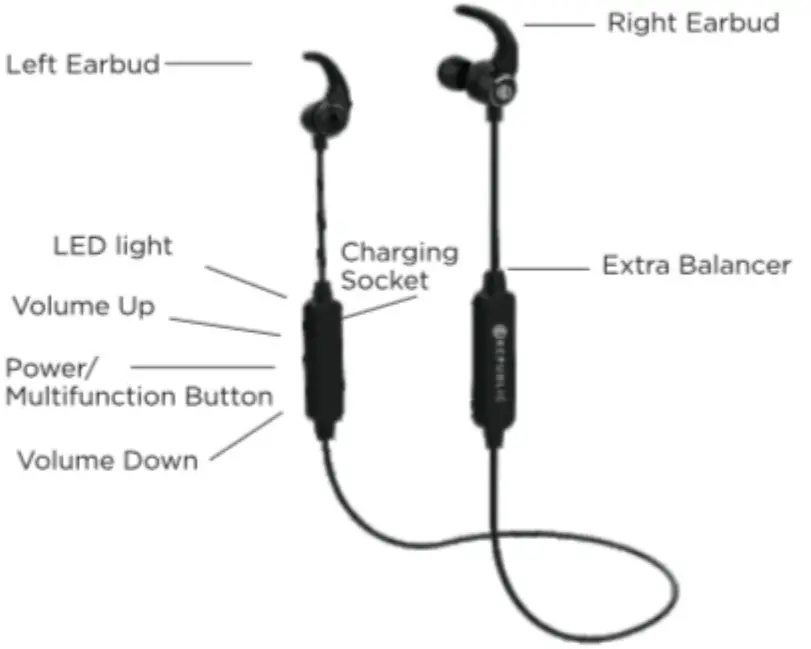
<p><img fetchpriority="high" decoding="async" class="attachment-post-thumbnail size-post-thumbnail aligncenter ezlazyloaded" src="images/6.webp" sizes="" srcset="" alt="NU REPUBLIC Bluetooth Wireless Earphone With mic - earphone" width="640" height="512" data-ezsrcset="https://manuals.plus/wp-content/uploads/2021/08/NU-REPUBLIC-Bluetooth-Wireless-Earphone-With-mic-earphone.jpg?ezimgfmt=ng:webp/ngcb1 811w,https://manuals.plus/wp-content/uploads/2021/08/NU-REPUBLIC-Bluetooth-Wireless-Earphone-With-mic-earphone-300x240.jpg?ezimgfmt=ng:webp/ngcb1 300w,https://manuals.plus/wp-content/uploads/2021/08/NU-REPUBLIC-Bluetooth-Wireless-Earphone-With-mic-earphone-768x615.jpg?ezimgfmt=ng:webp/ngcb1 768w" data-ezsrc="https://manuals.plus/wp-content/uploads/2021/08/NU-REPUBLIC-Bluetooth-Wireless-Earphone-With-mic-earphone.jpg?ezimgfmt=rs:612x490/rscb1/ng:webp/ngcb1" /></p>
<p><strong>Key Function:</strong></p>
<p>Volume Up: Short press for the previous song; Long press to increase the volume Volume Down: Short press for next song: Long press to decrease volume Power/Multifunction Button: Power on/off, answer/reject call, play/pause music</p>
<h4><strong>INCLUDED WITH EARPHONES</strong></h4>
<ul>
<li>Bluetooth Wireless Earphones</li>
<li>3 Sets of Eargels in 3 sizes</li>
<li>USB charging Cable</li>
<li>Storage Case (Only for Jaxx 3 not for jaxx4)</li>
<li>User Manual</li>
</ul>
<h4><strong>WEARING THE EARPHONES</strong></h4>
<ol>
<li>Carefully wear the earphones with L mark in your left ear, and the one with a right mark in your right ear.</li>
<li>Twist the earphones up into the ear canal while inserting, until outside noise is blocked out.</li>
</ol>
<p>Important:</p>
<p>If there seems to be a lack of low-frequency response (bass), it means the ear-tip is not forming a tight seal. push the earphones deeper into the ear canal or try to change different ear-tips.</p>
<p><strong>Removing the Earphones:</strong></p>
<p>Grasp the body of the earphones and gently twist to remove.</p>
<p>Note: Do not pull on the cable to remove earphones.</p>
<h4><strong>TWO-STEP BLUETOOTH CONNECTION</strong></h4>
<ol>
<li>Long press the power button to switch on the Bluetooth earphones.</li>
<li>Red and Blue lights will start flashing alternately.</li>
<li>Turn on Bluetooth in your mobile phone and connect “NU Republic” to the pair.</li>
</ol>
<h4><strong>PARAMETERS</strong></h4>
<table width="867">
<tbody>
<tr>
<td width="203"><strong>Bluetooth Version</strong></td>
<td width="219"><strong>5.0</strong></td>
</tr>
<tr>
<td width="203">Bluetooth Protocols</td>
<td width="219">HSP. HFP. A2DP.AVRCP</td>
</tr>
<tr>
<td width="203">Working Distance</td>
<td width="219">10m</td>
</tr>
<tr>
<td width="203">Music Play Time</td>
<td width="219">8 hours’</td>
</tr>
<tr>
<td width="203">Standby Time</td>
<td width="219">180 hours’</td>
</tr>
<tr>
<td width="203">Charging Time</td>
<td width="219">2 hours’</td>
</tr>
<tr>
<td width="203">Battery Capacity</td>
<td width="219">110 mAh</td>
</tr>
<tr>
<td width="203">Playing System</td>
<td width="219">iOs and Android</td>
</tr>
<tr>
<td width="203">Frequency</td>
<td width="219">20Hz – 20kHz</td>
</tr>
</tbody>
</table>
<h4><strong>CHARGING THE BATTERY</strong></h4>
<p><img decoding="async" src="https://usemanuals.com/wp-content/uploads/2023/07/NU-REPUBLIC-Bluetooth-Wireless-Earphone-With-mic-charging.webp" /></p>
<p>The earphones are partially charged at the factory, so it can be turned on and used normally. But before using it for the first time. make sure the earphones are fully charged.</p>
<ol>
<li>Connect the charging port to any USB charging adapter or computer USB port (currently does not exceed 1A).</li>
<li>The LED indicator turns red when charging.</li>
<li>When the LED indicator turns blue, the battery is full.</li>
</ol>
<p><strong>Notes:</strong></p>
<p>If you do not charge the earphones for a long time, the battery life will be greatly shortened. It is recommended that you charge the earphones at least once a month.</p>
<h4><strong>CHOOSING PERFECT EAR TIPS</strong></h4>
<p>It provides ear-tips in small/medium/large three sizes, made from premium grade rubber.<br />
Select an ear-tip that provides the best fit and sound isolation. It should be easy to insert, fit comfortably, and easy to remove.</p>
<h4><strong>DISCARDING THE EARPHONES</strong></h4>
<p>For proper treatment to avoid harmful effects on human health and the environment, please contact your local municipality, your waste disposal service or the point of sale where you purchased the items.</p>
<h4><strong>UNDERSTANDING THE WARRANTY</strong></h4>
<p>Nu Republic thanks you for showing confidence in our products and becoming our valued customers. To ensure a delightful product experience Nu Republic recommends reading the user guide carefully and contacting our customer care helpline to understand the product warranty period.<br />
Nu Republic warrants that the product at the time of its original purchase is free of defects in material and workmanship.<br />
This warranty is subject to the following terms.</p>
<p>As defects caused by the fact that the battery has been short-circuited or by the fact that the seals of the casing or any evidence of tampering or the product is used for equipment other than for which it is certified.</p>
<p>For any claim under the warranty is subject to notification to Nu Republic. For the alleged defect within a reasonable time of its occurrence and in no event not later than expiry of the warranty period.</p>
<p>Nu Republic / authorized partner will not be responsible for any kind of losses direct or indirect.</p>
<p>Nu Republic’s obligation under this warranty shall be limited to repair or providing replacement of parts only the maximum claim entertained by Nu Republic will be subject to the maximum retail price of the product or purchase price (as per invoice) whichever one is lower.</p>
<p><strong>Note: Check out our website </strong><a href="http://www.nurepublic.co/" target="_blank" rel="noopener"><strong>www.nurepublic.co</strong></a> <strong>for existing offers &amp; extended warranty.</strong></p>
<p>In an event of any unforeseen circumstances, there is the unavailability of certain spare parts, prevailing depreciation rules will be binding on the purchaser to accept as a commercial solution in lieu of repairs.<br />
Helpline Number: +91-8826257630<br />
Working Hours: Monday to Friday 10:00 AM- 5:30 PM (except national and public holidays)<br />
Email: <a href="mailto:hello@alchemie.co">hello@alchemie.co</a></p>
<p><img decoding="async" src="https://usemanuals.com/wp-content/uploads/2023/07/REPUBLIC-logo-1.webp" /></p>
<form id="commentform" class="comment-form" action="https://manuals.plus/wp-comments-post.php" method="post" novalidate="">
<p class="form-submit">
</form>
]]></content:encoded>


			</item>
	</channel>
</rss>

<!--
Performance optimized by W3 Total Cache. Learn more: https://www.boldgrid.com/w3-total-cache/

Page Caching using Disk: Enhanced 

Served from: usemanuals.com @ 2026-06-12 22:13:32 by W3 Total Cache
-->