
<?xml version="1.0" encoding="UTF-8"?><rss version="2.0"
	xmlns:content="http://purl.org/rss/1.0/modules/content/"
	xmlns:wfw="http://wellformedweb.org/CommentAPI/"
	xmlns:dc="http://purl.org/dc/elements/1.1/"
	xmlns:atom="http://www.w3.org/2005/Atom"
	xmlns:sy="http://purl.org/rss/1.0/modules/syndication/"
	xmlns:slash="http://purl.org/rss/1.0/modules/slash/"
	>

<channel>
	<title>BC MASTER &#8211; UseManuals</title>
	<atom:link href="http://usemanuals.com/bc-master/feed/" rel="self" type="application/rss+xml" />
	<link>https://usemanuals.com</link>
	<description>Owner&#039;s manuals for all sorts of products</description>
	<lastBuildDate>Sat, 08 Apr 2023 05:35:54 +0000</lastBuildDate>
	<language>en-US</language>
	<sy:updatePeriod>
	hourly	</sy:updatePeriod>
	<sy:updateFrequency>
	1	</sy:updateFrequency>
	<generator>https://wordpress.org/?v=6.7.2</generator>

<image>
	<url>https://usemanuals.com/wp-content/uploads/2025/02/favicon-32x32-2.png</url>
	<title>BC MASTER &#8211; UseManuals</title>
	<link>https://usemanuals.com</link>
	<width>32</width>
	<height>32</height>
</image> 
	<item>
		<title>BC MASTER BC-T05 True Wireless Earbuds Manual</title>
		<link>https://usemanuals.com/bc-master/bc-t05-earbuds/</link>
		
		<dc:creator><![CDATA[ItsManual]]></dc:creator>
		<pubDate>Sat, 08 Apr 2023 05:35:54 +0000</pubDate>
				<category><![CDATA[BC MASTER]]></category>
		<guid isPermaLink="false">https://usemanuals.com/?p=63834</guid>

					<description><![CDATA[&#160; User Manual True Wireless Earbuds Thank you for purchasing the BC MASTER BC-T05 True Wireless Earbuds. Please read this user manual carefully and keep it for future reference. If you need any assistance, please contact our support team with your product model number and Amazon order number. Package Contents True Wireless Earbuds Charging Case Three Pairs of Ear-Tips (S/M/L) USB-A to C Cable User Manual Quick Start Guide Warranty Card Product Diagram  Earbuds Model BC-T05 Technology BT5, A2DP, AVRCP, HFP, HSP Driver (each channel) 1x 7.2mm speaker driver Sensitivity 105 ± 3dB Frequency Range 20Hz – 20kHz Impedance 16ohm ± 15% Microphone Type MEMS (microphone chip) Microphone Sensitivity -19dB ± 4dB (at 1kHz) Microphone Frequency 300Hz – 3kHz Charging Time 1.5 hours Battery Life Up to 5 hours Battery Type Li-polymer (2 x 43mAh) Operating Range 10m / 33ft IP Rating IPX5 Weight 7.16g （pair ） Charging Case Charging Input DC 5V Charging Time 2.5 hours Battery Type Li-polymer (600mAh) Number of Earbuds Recharges 5 times (pair) Weight 33.28g Getting Started Charging Fully charge the charging case before first use. To charge,  connect the case to a USB charger or charging port with the included USB-A to C Cable. When all 3 LED charging indicator lights are white, the case is fully charged. Charging takes around 2.5 hours; and after being fully charged, the case can fully charge the earbuds  5  times.  The earbuds should be stored in the case when not in use. Note: Remove the protective film from the earbuds when using it for the first time. Turning On / Off Turn On Remove both earbuds from the charging case, or touch and hold on the touch-sensitive panels on both earbuds for 2 seconds when they are turned  off Turn Off Return both earbuds to the charging case, or touch and hold on the touch-sensitive panels  on both earbuds for 5 seconds when they are turned on Pairing Starting with the earbuds in the case: Take the earbuds out of the case. Turn on the pairing function on the device you want to pair with the earbuds From the list of available devices, find and select “BC-T05” If a code or PIN is required for pairing, enter “0000” Regular Use After Pairing Once the earbuds are successfully paired with your device, they can be switched on and off as follows: Take the earbuds out of the charging case, and they will turn on and connect with each other automatically To power off, put the earbuds back in the charging case, and they will begin charging Using the Left/Right Earbud Only Starting with the earbuds in the case: Take the left/right earbud out Turn on the pairing function on the device you want to pair with the earbud From the list of available devices, find and select “BC-T05” Notes  When you turn on the earbuds, they will automatically reconnect to the last-paired device or enter pairing mode if no paired device is found To clear the pairing list, touch and hold the touch-sensitive panels on both earbuds for 10 seconds when they are in the changing case In pairing mode, the earbuds will automatically turn off after 5 minutes if no devices are paired If one of the earbuds has no sound output, put both earbuds back in the charging case and take them out again The wireless operating range is 10m (33ft). If you exceed this range, the earbuds will disconnect from your paired device. The connection will be re-established if you re-enter the wireless range within 2 minutes. The earbuds will automatically reconnect to the last paired device. To connect with other devices, repeat the previous pairing steps Controls &#38; LED Indicators Streaming Audio Once paired, you can wirelessly stream audio from your device to the earbuds. Music will automatically pause when you receive an incoming phone call and resume once the call has ended. Play or pause Tap the touch-sensitive panel on either earbud Skip to the next track Double-tap the touch-sensitive panel on the right earbud Skip to the previous track Double-tap the touch-sensitive panel on left earbud Streaming Audio Answer or end a call Double-tap the touch-sensitive panel on either earbud to answer or end a call Reject an incoming call Touch and hold on the touch-sensitive panel on either earbud for  1 second Use Siri or other voice assistants While your device is connected, triple-tap the touch-sensitive panel on either earbud LED Status Indicator (Earbuds) Status Flashing red and white quickly Reconnecting Flashing white Pairing mode Solid red Earbuds charging Solid white for 1 minute then turn off (after charging) Earbuds fully charged LED Charging Indicator (Charging case) Status Flashing white Case charging Solid white for 10 seconds then turn off Case fully charged Note: the color of the LED indicator varies when the color of earbuds change. FAQ The earbuds are on, but not connecting to my device For the earbuds and your device to establish a connection, you need to put them both in pairing mode. Please follow the instructions in the Pairing section of this manual. I’ve connected the earbuds with my smartphone but can’t hear any sound Double-check the volume level on your smartphone and the earbuds. Some smartphones require you to set up the arbuds as an audio output device before the audio can be transmitted. If you’re using a music player or other device, please make sure it supports the A2DP profile. The sound isn’t very clear or the caller can’t hear my voice clearly Adjust the volume on your smartphone and the earbuds. Try moving closer to your smartphone to rule out the possibility of interference or wireless range-related issues. What’s the wireless range of the earbuds? The maximum range is 10m (33ft). However, the actual range depends on environmental factors. For optimal performance, keep your device connected within a range of roughly 4m to 8m and make sure that there are no major obstacles (like reinforced steel walls) between the earbuds and your device. The earbuds won’t turn on Try charging the earbuds for a while. If the earbuds still won’t power on, please contact our support team at the email address given in Warranty &#38; Customer Support. I put the earbuds back in the charging case, but the earbuds are still connected The charging case is probably out of power. Try charging it. Product Care &#38; Use Keep away from liquids and extreme heat Don’t use the earbuds at high volume for extended periods, as this may cause permanent hearing damage or loss Warranty &#38; Customer Support For questions, support, or warranty claims, contact us at the address below that corresponds with your region. Please include your Amazon order number and product model number. Amazon US orders: support@bc-master.com Amazon EU orders: support@bc-master.com Amazon CA orders: support@bc-master.com  *Please note, BC MASTER can only provide after-sales service for products purchased directly from BC MASTER. If you have purchased from a different seller, please contact them directly for service or warranty issues. CE Statement Max RF power level: BT classic (2402–2480MHz): 2.1dBm RF exposure assessment has been performed to prove that this unit will not generate the harmful EM emission above the reference level as specified in EC Council Recommendation (1999/519/EC). CAUTION: RISK OF EXPLOSION IF BATTERY IS REPLACED BY AN INCORRECT TYPE. DISPOSE OF USED BATTERIES ACCORDING TO THE INSTRUCTIONS. Excessive sound pressure from earphones and headphones can cause hearing loss. Hereby, Dongguan Xingji Electronics Co.,Ltd. declares that the radio equipment type (True Wireless Earbuds, BC-T05) is in compliance with Directive 2014/53/EU. Notice: This device may be used in each member state of the EU. FCC STATEMENT This device complies with Part 15 of the FCC rules. Operation is subject to the following two conditions: 1) this device may not cause harmful interference, and 2) this device must accept any interference received, including interference that may cause undesired operation. This equipment has been tested and found to comply with the limits for a Class B digital device, pursuant to Part 15 of the FCC rules. These limits are designed to provide reasonable protection against harmful interference in a residential installation. This equipment generates, uses, and can radiate radio frequency energy and if not installed and used in accordance with the instructions, may cause harmful interference to radio communications. However, there is no guarantee that interference will not occur in a particular installation. If this equipment does cause harmful interference to radio or television reception, which can be determined by turning the equipment off and on, the user is encouraged to try correct the interference by one or more of the following measures: – Reorient the receiving antenna. – Increase the separation between the equipment and receiver. – Connect the equipment into an outlet on a circuit different from that to which the receiver is connected. – Consult the dealer or an experienced radio/TV technician for help. Changes or modifications not expressly approved by the party responsible for compliance could void your authority to operate the equipment. www.bc-master.com &#124; support@bc-master.com Dongguan Xingji Electronics Co.,Ltd First Building of Huaxin Industrial Park Luxi Village Gaobu, Dongguan, Guangdong 523000 CN FCC ID: 2AW44-BCT05 [...]<p><a class="btn btn-secondary understrap-read-more-link" href="https://usemanuals.com/bc-master/bc-t05-earbuds/">Read More...</a></p>]]></description>
										<content:encoded><![CDATA[<p>&nbsp;</p>
<p><img decoding="async" src="https://usemanuals.com/wp-content/uploads/2023/03/BC-MASTER-logo.webp" /></p>
<p><strong>User Manual</strong><br />
<strong>True Wireless Earbuds</strong></p>
<p>Thank you for purchasing the BC MASTER BC-T05 True Wireless Earbuds. Please read this user manual carefully and keep it for future reference. If you need any assistance, please contact our support team with your product model number and Amazon order number.</p>
<h4>Package Contents</h4>
<p>True Wireless Earbuds<br />
Charging Case<br />
Three Pairs of Ear-Tips (S/M/L)<br />
USB-A to C Cable<br />
User Manual<br />
Quick Start Guide<br />
Warranty Card</p>
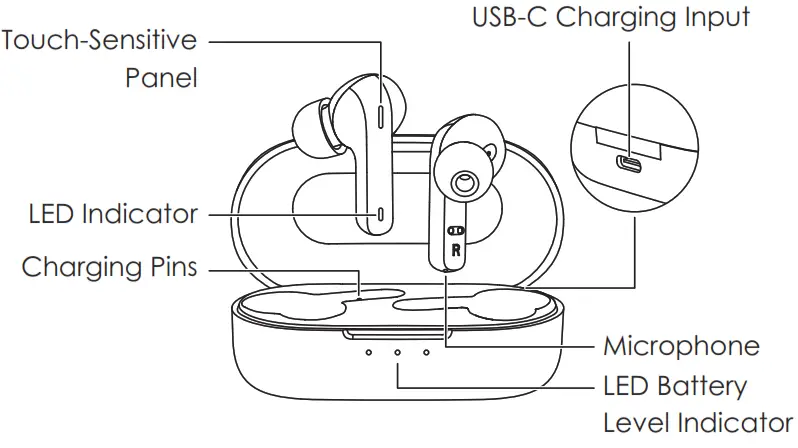
<p><strong>Product Diagram </strong></p>
<h4><img decoding="async" src="https://usemanuals.com/wp-content/uploads/2023/03/BC-MASTER-BC-T05-True-Wireless-Earbuds.webp" /></h4>
<p><strong>Earbuds</strong></p>
<table width="965">
<tbody>
<tr>
<td width="47">Model</td>
<td width="64">BC-T05</td>
</tr>
<tr>
<td>Technology</td>
<td>BT5, A2DP, AVRCP, HFP, HSP</td>
</tr>
<tr>
<td>Driver (each channel)</td>
<td>1x 7.2mm speaker driver</td>
</tr>
<tr>
<td>Sensitivity</td>
<td>105 ± 3dB</td>
</tr>
<tr>
<td>Frequency Range</td>
<td>20Hz – 20kHz</td>
</tr>
<tr>
<td>Impedance</td>
<td>16ohm ± 15%</td>
</tr>
<tr>
<td>Microphone Type</td>
<td>MEMS (microphone chip)</td>
</tr>
<tr>
<td>Microphone Sensitivity</td>
<td>-19dB ± 4dB (at 1kHz)</td>
</tr>
<tr>
<td>Microphone Frequency</td>
<td>300Hz – 3kHz</td>
</tr>
<tr>
<td>Charging Time</td>
<td>1.5 hours</td>
</tr>
<tr>
<td>Battery Life</td>
<td>Up to 5 hours</td>
</tr>
<tr>
<td>Battery Type</td>
<td>Li-polymer (2 x 43mAh)</td>
</tr>
<tr>
<td>Operating Range</td>
<td>10m / 33ft</td>
</tr>
<tr>
<td>IP Rating</td>
<td>IPX5</td>
</tr>
<tr>
<td>Weight</td>
<td>7.16g （pair ）</td>
</tr>
</tbody>
</table>
<p><strong>Charging Case</strong></p>
<table width="971">
<tbody>
<tr>
<td width="49">Charging Input</td>
<td width="64">DC 5V</td>
</tr>
<tr>
<td>Charging Time</td>
<td>2.5 hours</td>
</tr>
<tr>
<td>Battery Type</td>
<td>Li-polymer (600mAh)</td>
</tr>
<tr>
<td>Number of Earbuds Recharges</td>
<td>5 times (pair)</td>
</tr>
<tr>
<td>Weight</td>
<td>33.28g</td>
</tr>
</tbody>
</table>
<h4>Getting Started</h4>
<p><strong>Charging</strong><br />
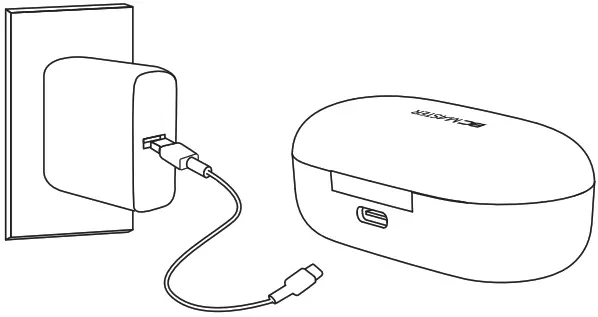
Fully charge the charging case before first use. To charge,  connect the case to a USB charger or charging port with the included USB-A to C Cable. When all 3 LED charging indicator lights are white, the case is fully charged. Charging takes around 2.5 hours; and after being fully charged, the case can fully charge the earbuds  5  times.  The earbuds should be stored in the case when not in use.<br />
<strong>Note:</strong> Remove the protective film from the earbuds when using it for the first time.</p>
<p><img decoding="async" src="https://usemanuals.com/wp-content/uploads/2023/03/BC-MASTER-BC-T05-True-Wireless-Earbuds-Charging.webp" /></p>
<h4>Turning On / Off</h4>
<table width="1285">
<tbody>
<tr>
<td width="47">Turn On</td>
<td width="64">Remove both earbuds from the charging case, or touch and hold on the touch-sensitive panels on both earbuds for 2 seconds when they are turned  off</td>
</tr>
<tr>
<td>Turn Off</td>
<td>Return both earbuds to the charging case, or touch and hold on the touch-sensitive panels  on both earbuds for 5 seconds when they are turned on</td>
</tr>
</tbody>
</table>
<p><strong>Pairing<br />
</strong>Starting with the earbuds in the case:</p>
<ol>
<li>Take the earbuds out of the case.</li>
<li>Turn on the pairing function on the device you want to pair with the earbuds</li>
<li>From the list of available devices, find and select “BC-T05”</li>
<li>If a code or PIN is required for pairing, enter “0000”</li>
</ol>
<p><strong>Regular Use After Pairing</strong><br />
Once the earbuds are successfully paired with your device, they can be switched on and off as follows:</p>
<ul>
<li>Take the earbuds out of the charging case, and they will turn on and connect with each other automatically</li>
<li>To power off, put the earbuds back in the charging case, and they will begin charging</li>
</ul>
<p><strong>Using the Left/Right Earbud Only</strong><br />
Starting with the earbuds in the case:</p>
<ol>
<li>Take the left/right earbud out</li>
<li>Turn on the pairing function on the device you want to pair with the earbud</li>
<li>From the list of available devices, find and select “BC-T05”</li>
</ol>
<p><strong>Notes </strong></p>
<ul>
<li>When you turn on the earbuds, they will automatically reconnect to the last-paired device or enter pairing mode if no paired device is found</li>
<li>To clear the pairing list, touch and hold the touch-sensitive panels on both earbuds for 10 seconds when they are in the changing case</li>
<li>In pairing mode, the earbuds will automatically turn off after 5 minutes if no devices are paired</li>
<li>If one of the earbuds has no sound output, put both earbuds back in the charging case and take them out again</li>
<li>The wireless operating range is 10m (33ft). If you exceed this range, the earbuds will disconnect from your paired device. The connection will be re-established if you re-enter the wireless range within 2 minutes. The earbuds will automatically reconnect to the last paired device. To connect with other devices, repeat the previous pairing steps</li>
</ul>
<h4>Controls &amp; LED Indicators</h4>
<p>Streaming Audio<br />
Once paired, you can wirelessly stream audio from your device to the earbuds. Music will automatically pause when you receive an incoming phone call and resume once the call has ended.</p>
<table width="1189">
<tbody>
<tr>
<td width="49">Play or pause</td>
<td width="47">Tap the touch-sensitive panel on either earbud</td>
</tr>
<tr>
<td>Skip to the next track</td>
<td>Double-tap the touch-sensitive panel on the right earbud</td>
</tr>
<tr>
<td>Skip to the previous track</td>
<td>Double-tap the touch-sensitive panel on left earbud</td>
</tr>
</tbody>
</table>
<p><strong>Streaming Audio</strong></p>
<table width="1207">
<tbody>
<tr>
<td width="49">Answer or end a call</td>
<td width="47">Double-tap the touch-sensitive panel on either earbud to answer or end a call</td>
</tr>
<tr>
<td>Reject an incoming call</td>
<td>Touch and hold on the touch-sensitive panel on either earbud for  1 second</td>
</tr>
<tr>
<td>Use Siri or other voice assistants</td>
<td>While your device is connected, triple-tap the touch-sensitive panel<br />
on either earbud</td>
</tr>
</tbody>
</table>
<table width="1202">
<tbody>
<tr>
<td width="465"><strong>LED Status Indicator (Earbuds)</strong></td>
<td width="292"><strong>Status</strong></td>
</tr>
<tr>
<td width="465">Flashing red and white quickly</td>
<td width="292">Reconnecting</td>
</tr>
<tr>
<td width="465">Flashing white</td>
<td width="292">Pairing mode</td>
</tr>
<tr>
<td width="465">Solid red</td>
<td width="292">Earbuds charging</td>
</tr>
<tr>
<td width="465">Solid white for 1 minute then turn off (after charging)</td>
<td width="292">Earbuds fully</p>
<p>charged</td>
</tr>
</tbody>
</table>
<table width="1205">
<tbody>
<tr>
<td width="487"><strong>LED Charging Indicator </strong><strong>(Charging case)</strong></td>
<td width="270"><strong>Status</strong></td>
</tr>
<tr>
<td width="487">Flashing white</td>
<td width="270">Case charging</td>
</tr>
<tr>
<td width="487">Solid white for 10 seconds then turn off</td>
<td width="270">Case fully charged</td>
</tr>
</tbody>
</table>
<p><strong>Note:</strong> the color of the LED indicator varies when the color of earbuds change.</p>
<h4>FAQ</h4>
<p>The earbuds are on, but not connecting to my device For the earbuds and your device to establish a connection, you need to put them both in pairing mode. Please follow the instructions in the Pairing section of this manual.</p>
<p>I’ve connected the earbuds with my smartphone but can’t hear any sound<br />
Double-check the volume level on your smartphone and the earbuds. Some smartphones require you to set up the arbuds as an audio output device before the audio can<br />
be transmitted. If you’re using a music player or other device, please make sure it supports the A2DP profile.<br />
<strong>The sound isn’t very clear or the caller can’t hear my voice clearly</strong><br />
Adjust the volume on your smartphone and the earbuds. Try moving closer to your smartphone to rule out the possibility of interference or wireless range-related issues.<br />
<strong>What’s the wireless range of the earbuds?</strong><br />
The maximum range is 10m (33ft). However, the actual range depends on environmental factors. For optimal performance, keep your device connected within a range of roughly 4m to 8m and make sure that there are no major obstacles (like reinforced steel walls) between the earbuds and your device.<br />
<strong>The earbuds won’t turn on</strong><br />
Try charging the earbuds for a while. If the earbuds still won’t power on, please contact our support team at the email address given in Warranty &amp; Customer Support.<br />
<strong>I put the earbuds back in the charging case, but the earbuds are still connected</strong><br />
The charging case is probably out of power. Try charging it.</p>
<h4>Product Care &amp; Use</h4>
<ul>
<li>Keep away from liquids and extreme heat</li>
<li>Don’t use the earbuds at high volume for extended periods, as this may cause permanent hearing damage or loss</li>
</ul>
<h4>Warranty &amp; Customer Support</h4>
<p>For questions, support, or warranty claims, contact us at the address below that corresponds with your region. Please include your Amazon order number and product model<br />
number.<br />
<strong>Amazon US orders:</strong> <a href="mailto:support@bc-master.com">support@bc-master.com</a><br />
<strong>Amazon EU orders:</strong> <a href="mailto:support@bc-master.com">support@bc-master.com</a><br />
<strong>Amazon CA orders:</strong> <a href="mailto:support@bc-master.com">support@bc-master.com </a></p>
<p>*Please note, BC MASTER can only provide after-sales service for products purchased directly from BC MASTER. If you have purchased from a different seller, please contact them directly for service or warranty issues.</p>
<p><strong>CE Statement</strong><br />
Max RF power level:<br />
BT classic (2402–2480MHz): 2.1dBm RF exposure assessment has been performed to prove that this unit will not generate the harmful EM emission above the reference level as specified in EC Council Recommendation (1999/519/EC).<br />
CAUTION: RISK OF EXPLOSION IF BATTERY IS REPLACED BY AN INCORRECT TYPE. DISPOSE OF USED BATTERIES ACCORDING TO THE<br />
INSTRUCTIONS. Excessive sound pressure from earphones and headphones can cause hearing loss.</p>
<p><img decoding="async" src="https://usemanuals.com/wp-content/uploads/2023/03/BC-MASTER-BC-T05-True-Wireless-Earbuds-warning.webp" /> Hereby, Dongguan Xingji Electronics Co.,Ltd. declares that the radio equipment type (True Wireless Earbuds, BC-T05) is in compliance with Directive 2014/53/EU.</p>
<p><strong><img decoding="async" src="https://usemanuals.com/wp-content/uploads/2023/03/Laney-R210-Bass-Guitar-Cabinet-icon-2-1.webp" /> Notice</strong>: This device may be used in each member state of the EU.</p>
<h4>FCC STATEMENT</h4>
<p>This device complies with Part 15 of the FCC rules. Operation is subject to the following two conditions: 1) this device may not cause harmful interference, and 2) this device must accept any interference received, including interference that may cause undesired operation. This equipment has been tested and found to comply with the limits for a Class B digital device, pursuant to Part 15 of the FCC rules. These limits are designed to provide reasonable protection against harmful interference in a residential installation. This equipment generates, uses, and can radiate radio frequency energy and if not installed and used in accordance with the instructions, may cause harmful interference to radio communications. However, there is no guarantee that interference will not occur in a particular installation. If this equipment does cause harmful interference to radio or television reception, which can be determined by turning the equipment off and on, the user is encouraged to try correct the interference by one or more of the following measures:<br />
– Reorient the receiving antenna.<br />
– Increase the separation between the equipment and receiver.<br />
– Connect the equipment into an outlet on a circuit different from that to which the receiver is connected.<br />
– Consult the dealer or an experienced radio/TV technician for help.<br />
Changes or modifications not expressly approved by the party responsible for compliance could void your authority to operate the equipment.</p>
<p><a href="http://www.bc-master.com" target="_blank" rel="noopener">www.bc-master.com</a> |<a href="mailto:support@bc-master.com"> support@bc-master.com</a><br />
Dongguan Xingji Electronics Co.,Ltd<br />
First Building of Huaxin Industrial Park Luxi Village Gaobu,<br />
Dongguan, Guangdong 523000 CN<br />
FCC ID: 2AW44-BCT05</p>
<p><img decoding="async" src="https://usemanuals.com/wp-content/uploads/2023/03/BC-MASTER-BC-T05-True-Wireless-Earbuds-warning-1.webp" /></p>
<form id="commentform" class="comment-form" action="https://manuals.plus/wp-comments-post.php" method="post" novalidate="">
<p class="form-submit"><input id="comment_post_ID" name="comment_post_ID" type="hidden" value="1953349" /><br />
<input id="comment_parent" name="comment_parent" type="hidden" value="0" /></p>
</form>
]]></content:encoded>


			</item>
	</channel>
</rss>

<!--
Performance optimized by W3 Total Cache. Learn more: https://www.boldgrid.com/w3-total-cache/

Page Caching using Disk: Enhanced 

Served from: usemanuals.com @ 2026-06-13 02:01:17 by W3 Total Cache
-->